
Industry-Oriented Training | ⭐ Hands-On Practical Labs
Oracle Clustering:
Oracle 19c/26ai Real Application Clusters (RAC) Training
This course helps database administrators gain hands-on experience with Oracle 19c/26ai RAC environments, including installation, configuration, backup and recovery, cluster management, and troubleshooting.
4.8
- Duration: 40+ Hours
- Course level: Beginner to Advanced
What I will learn?
- Understand Oracle RAC architecture and cluster concepts
- Install and configure Oracle Grid Infrastructure
- Create and manage RAC databases
- Configure shared storage and ASM disk groups
- Implement failover and load balancing in RAC environments
- Perform backup and recovery in RAC using RMAN
- Manage Oracle Clusterware components
- Monitor RAC performance and tune RAC databases
- Troubleshoot cluster issues and RAC database problems
- Configure services, TAF, and Application Continuity
About Course
The Oracle 19c/26ai RAC Training at Aalok Institute is designed for database administrators who want to gain expertise in high-availability Oracle database environments.
Oracle Real Application Clusters (RAC) allows multiple servers to run the same Oracle database simultaneously, providing scalability, reliability, and high availability for enterprise applications.
In this course, students will learn how to install Oracle Grid Infrastructure, configure RAC clusters, manage cluster resources, and administer RAC databases using Oracle utilities and command-line tools. The training also covers automatic storage management (ASM), failover mechanisms, RAC backup and recovery strategies, and performance tuning techniques.
Participants gain practical experience in cluster configuration, service management, troubleshooting RAC environments, and optimizing RAC performance using tools like AWR, ADDM, and performance views.
By the end of the course, students will be able to deploy and manage Oracle RAC systems used in enterprise data centers and high-availability production environments.
Career Opportunities After Oracle RAC Training
This course prepares learners for roles such as:
- Oracle RAC Administrator
- Senior Oracle Database Administrator
- Database Infrastructure Engineer
- High Availability Database Specialist
- Oracle Database Architect
Oracle RAC expertise is highly valued because organizations rely on clustered database environments for mission-critical applications and enterprise systems.
Course Curriculum
- Cluster Architecture
- Shared Storage
- Nodes and Interconnects
- Oracle Cluster Registry (OCR)
- The RAC Voting Disk
- What is Oracle Grid Infrastructure?
- What is a Cluster?
- What is a Flex Cluster?
- Clusterware Characteristics
- Oracle Clusterware
- Hardware and Software Concepts (High level)
- RAC and Flex ASM
- Grid Infrastructure Components
- Grid Infrastructure Processes
- Grid Infrastructure Pre-installation Steps
- Configuring DNS and DHCP Configuration
- Node Preparation
- Configuring the OS Environment
- Installing Grid Infrastructure
- cluvfy – The Grid Infrastructure Verification Utility
- Grid Infrastructure Post-installation Steps
- Continuation of Grid Infrastructure Installation
- Installing DB Software and Creating a RAC Database
- Installation Overview
- Verifying System Readiness with the CVU
- Installing the Database Software
- Troubleshooting Installation Setup
- Recommended Post-installation Tasks
- Database Pre-Creation Tasks
- Initialization Parameters
- Creating a Cluster Database Using DBCA
- Oracle Single-Instance Architecture
- Overview of RAC
- RAC Architecture
- Multitenant Architecture and RAC
- RAC Instances and Parameter Files
- RAC Database Components
- RAC Instance Background Processes
- Global Resource Directory
- Overview of Cache Fusion
- Cache Fusion Components – GES and GCS
- Cache Fusion Components – Resource Master and GRD
- Cache Fusion Background Processes
- Application Connection to RAC
- Determining the Location of the Oracle Clusterware Configuration Files
- Managing SCAN and Local Listener
- Troubleshooting Grid Infrastructure CRS issues
- Troubleshoot grid node eviction issues
- Backing Up and Recovering Voting Disks
- Changing the OCR Configuration
- Backing Up and Recovering the OCR
- Restoring from Automatic OCR Backups
- ASM Overview
- ASM Initialization Parameters
- Accessing an ASM Instance
- ASM Startup and Shutdown
- Creating a Disk Group
- Changing a Disk Group
- Creating and Managing a Database
- Using Oracle-Managed Files
- Creating and Managing a Tablespace on ASM
- Creating and Managing Redo Logs
- Creating and Managing Control Files
- Creating and Managing Archive Logs
- ASM Dynamic Volume Manager
- Managing ASM Volumes
- Implementing ASM Cluster File System
- Managing ASM Cluster File System (ACFS)
- Using Command Line Tools To Manage ACFS
- Overview of RAC Instance Management
- Starting and Stopping a RAC Database
- Starting and Stopping a RAC Instance
- RAC Database Identical Parameters
- RAC Database Unique Parameters
- Changing Parameter Values
- Administering Undo Tablespaces in RAC
- Administering Redo Logs in RAC
- The crsctl Utility
- The ocrcheck Utility
- The ocrdump Utility
- The oifcfg Utility
- The Server Control (SRVCTL) Utility
- SRVCTL ADD
- SRVCTL CONFIG
- SRVCTL ENABLE and DISABLE
- SRVCTL MODIFY
- SRVCTL RELOCATE
- SRVCTL STATUS
- SRVCTL REMOVE
- SRVCTL START
- SRVCTL STOP
- Backup and Recovery in case of RAC
- Configuration of Recovery Manager (RMAN) on RAC
- Migrating Tablespaces and Database from Non ASM to ASM
- Log Archiving in RAC
- Undo Tablespaces in RAC
- Performing RMAN Backups of a RAC Database
- Recover the RAC Database with RMAN
- Overview of Services
- Types of Services
- Creating Services with SRVCTL
- Preferred and Available Instances for Services
- Using Services
- Managing Services
- Service Views
- Transparent Application Failover (TAF)
- Client-Side vs. Server-Side Load Balancing
- Configuring TAF on the Client
- Configuring TAF on the Server
- Using OEM to Configure TAF
- Using SRVCTL to Configure TAF
- Connecting to the Database with TAF
- Monitoring TAF Connections
- Adding and Deleting Node
- What is AC?
- What problem does it solve?
- Benefits of AC
- How AC works
- AC Architecture
- Side Effects
- Restrictions
- Application requirements
- RAC Tuning Methodology
- Using Performance Views in RAC
- Monitoring Cache Fusion
- Global Cache Latencies
- Monitoring Cache Transfers
- OEM – Cluster Database Performance
- OEM – RAC-Related Reports
- Using AWR in the RAC Environment
- Generating AWR Reports
- Analyzing AWR Reports
- Using ADDM in the RAC Environment
- Analyzing ADDM Reports
- RAC Tuning Tips
- The Oracle Clusterware Alert Log
- Clusterware Component Log Files
- Using crsctl to Diagnose Cluster Issues
- Troubleshooting the OCR
- RAC Database Alerts
Requirements
- Experience working with Oracle Database (Standalone Environment)
- Basic understanding of Linux/Unix operating systems
- Knowledge of Oracle database administration concepts
- Familiarity with Oracle 19c/26ai database environment (recommended)
Course Includes
- 40+ Hours Instructor-Led Training
- Hands-On RAC Configuration Practice
- Real Enterprise RAC Setup Scenarios
- Practical Cluster Administration Exercises
- Resume Preparation & Career Guidance
- Course Completion Certificate
Sample Course Completion Certificate
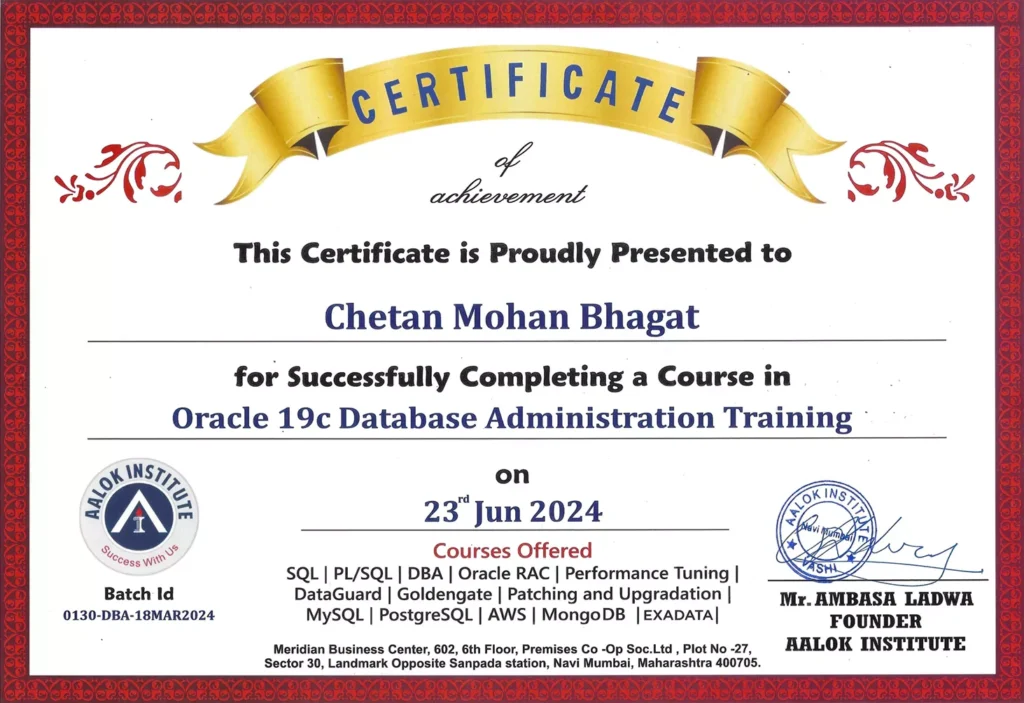
Oracle Clustering Training
Benefits Obtained :
- Live Online & Offline Classes
- PDF Study Materials & Notes Provided
- Real-Time Hands-On Practice
- Course Completion Certification
Why Join Aalok Institute for RAC Training?
- Trainers with Real Enterprise DBA Experience
- Hands-On RAC Environment Training
- Real-Time Production Scenarios
- Small Batch Size for Personalized Attention
- Flexible Online & Classroom Training Options
- Job-Oriented Database Administration Training
Who Should Join This Courses?
This Course is ideal for:

Trusted by Professionals from Leading Companies
Students and working professionals from top organizations rely on Aalok Institute for practical DBA and cloud training.








Become an Oracle RAC Expert
Gain the skills required to deploy, manage, and troubleshoot high-availability Oracle RAC environments used by large enterprises worldwide.