Industry-Oriented Training | ⭐ Hands-On Practical Labs
Oracle Patching and Upgradation Training
Learn how to apply patches, upgrade Oracle databases, perform database migrations, and manage Oracle Grid Infrastructure upgrades in real enterprise environments.
4.8
- Duration: 40+ Hours
- Course level: Beginner to Advanced
What I will learn?
- Apply PSU, Patch Sets, and Interim Patches on Oracle databases
- Perform database upgrades from 11g → 12c → 19c
- Upgrade Oracle RAC and Grid Infrastructure environments
- Implement rolling upgrades in RAC clusters
- Migrate databases using RMAN, Transportable Tablespaces, and Full Transportable methods
- Perform database downgrades and rollback strategies
- Implement multitenant architecture with CDB and PDB
- Perform database upgrades using DBUA, Manual, and AutoUpgrade tools
About Course
The Oracle Patching and Upgradation Training at Aalok Institute is designed for database administrators and IT professionals who want to gain real-world expertise in Oracle database patching, upgrades, and migrations.
This course provides hands-on training in applying Oracle patches, upgrading databases across different Oracle versions, implementing rolling upgrades in RAC environments, and performing database migrations across platforms and storage systems.
Participants will learn upgrade strategies using DBUA, AutoUpgrade, RMAN backup migration, Transportable Database (TDB), and Full Transportable Tablespace methods. The course also covers downgrade procedures, patch rollback strategies, and Grid Infrastructure upgrades.
By the end of this course, learners will be able to plan, execute, and troubleshoot complex Oracle database upgrades and patch management processes in enterprise environments.
Career Opportunities After Oracle Patching & Upgrade Training
This course prepares learners for roles such as:
- Oracle Database Administrator (DBA)
- Oracle RAC Administrator
- Senior Oracle DBA
- Database Migration Specialist
- Database Infrastructure Engineer
Course Curriculum
• Applying PSU on GI/DB home (On standalone and RAC) manually
• Applying PSU on GI/DB home (On standalone and RAC) auto apply
• Applying Interim Patches (On standalone and RAC)
• Applying Patch set (On standalone and RAC)
• Upgrading Database on Standalone
• Rolling Upgrading on RAC
• Upgrading Database on Datagaurd Setup.
• Upgrade/Migrate From 11.2.0.4.0 To 12.1.0.2.0 On OEL Linux 64 Bit
(Source and Target are in Same OS i.e. OEL Linux 64 Bit)
• Out-of-place/In Place Upgrade
• Home Cloning
• Multitenant Architure, CDB,PDB Creations
• GoldImage Creation In 19c
• 12c Appex Upgrade before database upgrade from 12.2.0.1.0 To 19.3.0.0.0
• From 12c CDB one PDB move to 19c CDB and upgrade Single PDB
• Upgrade Database 12.2.0.1.0 To 19.3.0.0.0 Using DBUA/Manual/autoupgrade method
• Out of Place upgrade from 12.2.0.1.0 To 19.3.0.0.0 On different Machine using RMAN backup
• TDB - Transportable Database followed by Manual Upgrade from 12.2.0.1.0 To 19.3.0.0.0
• Upgrade from 12.2.0.1.0 To 19.3.0.0.0 Using Full Transportable TableSpace Method On Different Machine with different mount point
• Upgrade from 12.2.0.1.0 To 19.3.0.0.0 Using FullTransportable TableSpace Method From FileSystem To ASMDiskgroup
• Upgrade from 12.2.0.1.0 To 19.3.0.0.0 Using TransportableTableSpace Method
• Manual TimeZone Upgrade in 19c after database upgrade from 12.2.0.1.0 To 19.3.0.0.0
• Using RMAN Tablespaces/DataFiles Conversion for Cross-Platform Upgrade
• OJVM Patch Apply
• Downgrade Database From 19.3.0.0.0 To 12.2.0.1.0 Using Flashback database Strategy
• Downgrade Database From 19.3.0.0.0 To 12.2.0.1.0 Manual Method
• 12.2.0.1.0 To 19.3.0.0.0 GI Upgrade and 19c New Software Installation followed by 12.2.0.1.0 To 19.3.0.0.0 DB Upgrade Using DBUA
• Downgrade RAC/Clusterware/GridInfrastructure From 19.3.0.0.0 To 12.2.0.1.0
• Rollback Patch 28553832 on GIHome and DBHomes
• Downgrade Database From 19.3.0.0.0 To 12.2.0.1.0 Using Flashback database Strategy in RAC
• Downgrade Database From 19.3.0.0.0 To 12.2.0.1.0 Manual Method in RAC
• Multitenant Architure, CDB,PDB Creations
• Manual TimeZone Upgrade in 12c
• 11g Appex Upgrade before database upgrade from 11.2.0.1.0 To 12.2.0.1.0
• Upgrade Database 11.2.0.1.0 To 12.2.0.1.0 Using DBUA/Manual/autoupgrade method
• After Upgrading 11g to 12c , Converting Non CDB to PDB
• Out of Place upgrade from 11.2.0.1.0 To 12.2.0.1.0 On different Machine using RMAN backup
• TDB - Transportable Database followed by Manual Upgrade from 11.2.0.1.0 To 12.2.0.1.0
• Upgrade from 11.2.0.1.0 To 12.2.0.1.0 Using Full Transportable TableSpace Method On Different Machine with different mount point
• Upgrade from 11.2.0.1.0 To 12.2.0.1.0 Using FullTransportable TableSpace Method From FileSystem To ASMDiskgroup
• Upgrade from 11.2.0.1.0 To 12.2.0.1.0 Using Transportable TableSpace Method
• Manual TimeZone Upgrade in 12c after database upgrade from 11.2.0.1.0 To 12.2.0.1.0
• Using RMAN Tablespaces/DataFiles Conversion for Cross-Platform Upgrade
• OJVM Patch Apply
• Downgrade Database From 12.2.0.1.0 To 11.2.0.4.0 Using Flashback database Strategy
• Downgrade Database From 12.2.0.1.0 To 11.2.0.4.0 Manual Method
• Apply Patches Before 11gR2 To 12cR2 RAC Upgrade on GIHome and DBHome
• Patch 24436338 - Oracle Grid Infrastructure Patch Set Update 11.2.0.4.161018
• Upgrade RAC/Clusterware/GridInfrastructure From 11.2.0.1.0 To 12.2.0.1.0
• Install 12c DB Software For RAC
• Upgrade Database 11.2.0.4.0 To 12.2.0.1.0 Using DBUA/Manual/autoupgrade method
• Downgrade RAC/Clusterware/GridInfrastructure From 12.2.0.1.0 To 11.2.0.4.0
• Downgrade Database From 12.2.0.1.0 To 11.2.0.4.0 Using Flashback database Strategy in RAC
• Downgrade Database From 12.2.0.1.0 To 11.2.0.4.0 Manual Method in RAC
• Rollback Patch 24436338 on GIHome and DBHomes
• 11.2.0.4.0 To 12.1.0.2.0 CRS, ASM and Manual DB Upgrades On RAC
• 11.2.0.3.0 To 11.2.0.4.0 CRS and DB Upgrades CRS, ASM and Manual DB Upgrades On RAC
Requirements
- Basic Oracle Database Administration knowledge
- Understanding of Oracle Linux or Unix environments
- Familiarity with Oracle RAC and ASM concepts
- Knowledge of backup and recovery using RMAN
Course Includes
- 40+ Hours of Practical Training
- Real-Time Oracle Upgrade Scenarios
- Hands-On Lab Environment
- Enterprise Database Migration Techniques
- Resume Preparation
- Course Completion Certificate
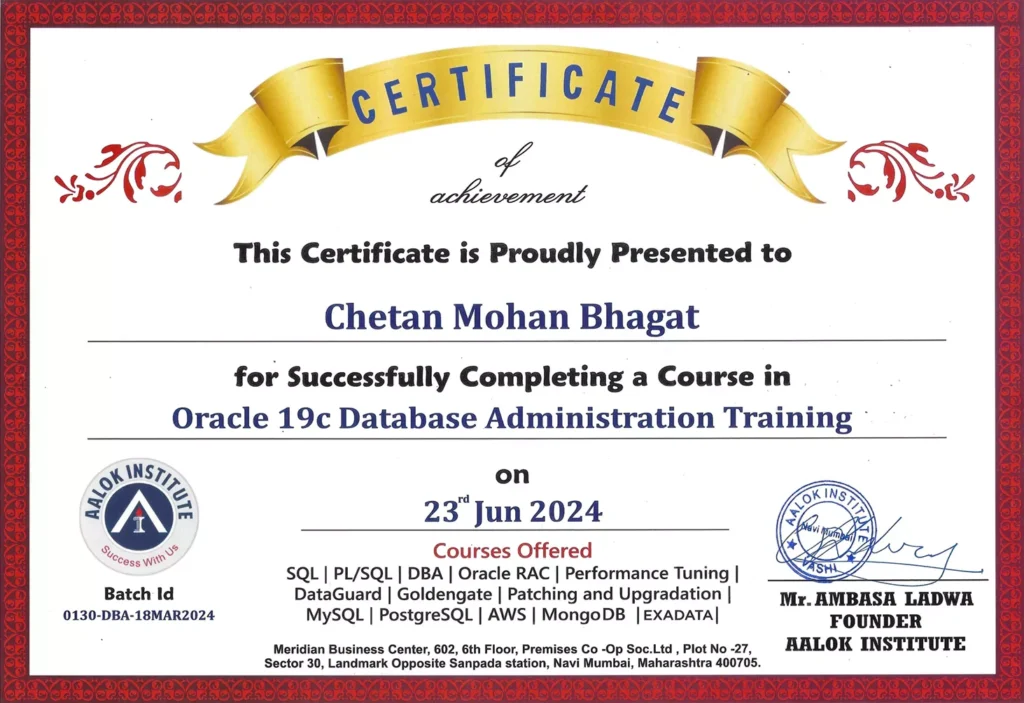
Sample Course Completion Certificate
Oracle Patching and Upgradation
Benefits Obtained :
- Live Online & Offline Classes
- PDF Study Materials & Notes Provided
- Real-Time Hands-On Practice
- Course Completion Certification
Why Join Aalok Institute for Oracle Patching Training?
- Industry-Experienced Trainers
- Real-Time Enterprise Upgrade Scenarios
- Hands-On Database Administration Practice
- Small Batch Size for Personalized Attention
- Flexible Online & Classroom Training Options
- Job-Oriented Curriculum
Who Should Join This Courses?
This Course is ideal for:

Trusted by Professionals from Leading Companies
Students and working professionals from top organizations rely on Aalok Institute for practical DBA and cloud training.





Become an Oracle Database Upgrade Specialist
Gain the skills to upgrade, patch, and migrate enterprise Oracle databases safely and efficiently across different environments.