
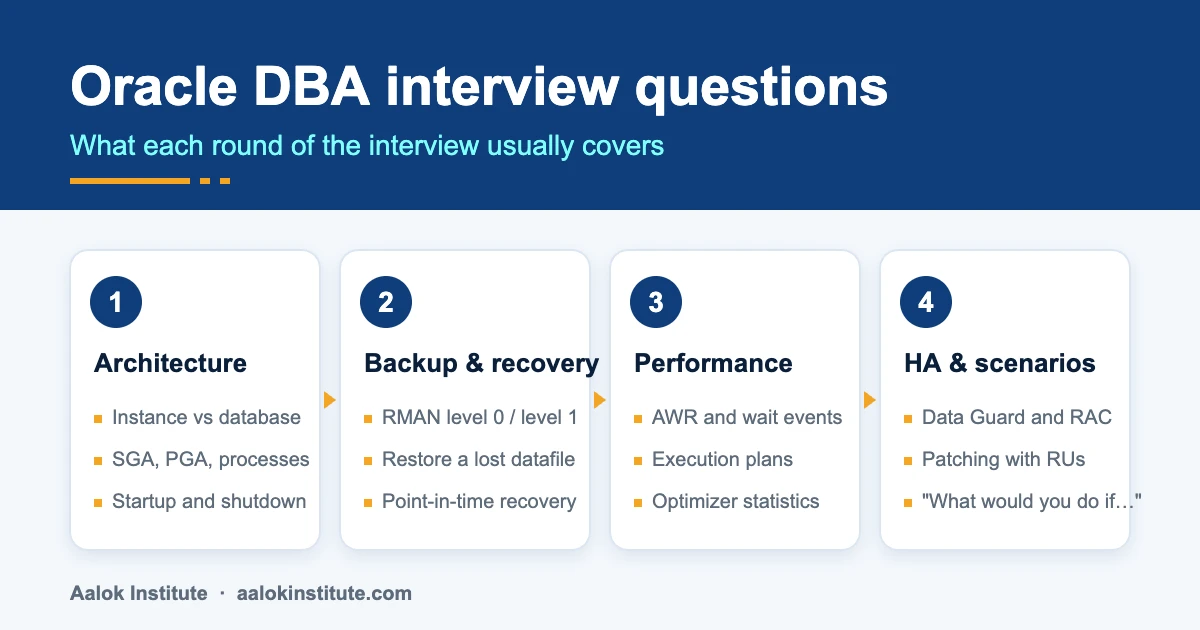
Most Oracle DBA interviews follow the same pattern. They start with architecture, move on to backups, check whether you can read a performance problem, and, if you have a few years behind you, finish with “the database is down, what do you do?”
Below are the 60 Oracle DBA interview questions we see asked again and again, with answers short enough to say out loud and the commands an interviewer may ask you to write. Freshers, start at the top. With two or more years of experience, skim the first two sections and spend your time on high availability, patching and the scenario round, because that’s where experienced interviews are usually decided.
Jump to a section:
- Architecture: Oracle DBA interview questions for freshers
- Storage, users and security
- Backup and recovery (RMAN)
- Performance tuning questions
- High availability: Data Guard and RAC
- Patching and upgrades
- Scenario-based Oracle DBA interview questions (2+ years experience)
- How to prepare for an Oracle DBA interview
- FAQ
Architecture: Oracle DBA interview questions for freshers
Almost every interview opens here, even for senior roles. Don’t recite definitions. Interviewers want to hear that you understand how the pieces fit together.
1. What is the difference between an Oracle instance and a database?
The database is the set of physical files on disk: datafiles, control files and online redo log files. The instance is the memory (the SGA) and the background processes that run on the server and let users read and change those files.
In a single-instance setup one instance opens one database. In Oracle RAC, several instances on different servers open the same database.
2. What are the main components of the SGA?
The System Global Area is shared memory used by all sessions. Its main parts are the database buffer cache (copies of data blocks), the shared pool (the library cache with parsed SQL and PL/SQL, and the data dictionary cache), the redo log buffer (change records waiting for LGWR), the large pool (used by RMAN, shared server and parallel query) and the Java and Streams pools.
With Automatic Shared Memory Management (SGA_TARGET), Oracle sizes most of these pools for you.
3. What is the PGA?
The Program Global Area is private memory for each server process. It holds sort and hash work areas, session variables and cursor state. You size it as a whole with PGA_AGGREGATE_TARGET, and from 12c PGA_AGGREGATE_LIMIT sets a hard upper limit.
4. Name the mandatory background processes and what each one does.
DBWn writes modified (dirty) buffers from the buffer cache to the datafiles. LGWR writes the redo log buffer to the online redo logs: on commit, every three seconds and when the buffer is a third full. CKPT signals checkpoints and updates the datafile headers and control file. SMON performs instance recovery at startup and cleans up temporary segments. PMON cleans up after failed user processes and releases their locks.
Mention ARCn (copies filled redo logs to the archive destination in ARCHIVELOG mode) and MMON (collects AWR statistics).
5. What happens when a user issues COMMIT?
The server process places a commit record, with an SCN, in the redo log buffer. LGWR writes the redo entries, including the commit record, to the online redo log files, and only when that write completes does the user see “Commit complete”.
The changed data blocks are not written to the datafiles at commit; DBWn writes them later. Redo, not the datafiles, is what makes a committed change durable (Oracle calls this a fast commit). Say “DBWn writes the data on commit” and the rest of the interview gets harder.
6. What is stored in the control file?
The control file records the database name and DBID, the names and locations of all datafiles and online redo logs, the current log sequence number, checkpoint information, archived log history and, when no recovery catalog is used, RMAN backup metadata.
Because the database cannot mount without it, the control file should always be multiplexed: at least two copies on different disks or disk groups.
7. What is the difference between redo and undo?
Redo records every change so it can be re-applied (rolled forward) after a crash or during media recovery. Undo stores the before-image of changed data so a transaction can be rolled back and other sessions get a read-consistent view.
Redo lives in the redo log files; undo lives in the undo tablespace. Changes to undo are themselves protected by redo.
8. What is a tablespace, and what are the types?
A tablespace is a logical storage container made of one or more datafiles (or tempfiles). Permanent tablespaces hold tables and indexes, temporary tablespaces hold sort and hash data that spills out of memory, and the undo tablespace holds undo. SYSTEM and SYSAUX hold the data dictionary and auxiliary components such as the AWR repository.
9. What are the startup stages of an Oracle database?
NOMOUNT: the parameter file is read, the SGA is allocated and the background processes start. MOUNT: the control file is opened, so Oracle knows where the datafiles and redo logs are; recovery, renaming files and enabling ARCHIVELOG mode are done here. OPEN: the datafiles and redo logs are opened and users can connect.
The shutdown modes are NORMAL, TRANSACTIONAL, IMMEDIATE and ABORT. Only ABORT leaves the database needing instance recovery at the next startup.
10. What is the difference between an SPFILE and a PFILE?
A PFILE (init.ora) is a text file you edit by hand. An SPFILE is a binary server parameter file that Oracle maintains, so ALTER SYSTEM ... SCOPE=SPFILE, MEMORY or BOTH changes can persist across restarts. You can create one from the other:
CREATE SPFILE FROM PFILE;
CREATE PFILE='/tmp/init_backup.ora' FROM SPFILE;
11. What is a CDB and a PDB?
In the multitenant architecture, a container database (CDB) holds the root container (CDB$ROOT), the seed (PDB$SEED) and one or more pluggable databases (PDBs). Each PDB looks like a standalone database to applications, while all PDBs share one instance’s memory and background processes.
The non-CDB architecture was deprecated in 12c and desupported from 21c, so multitenant is the standard for current releases.
12. What is the data dictionary?
The data dictionary is a read-only set of tables and views, stored in the SYSTEM tablespace, that describes the database: users, objects, privileges and storage. You query it through the DBA_, ALL_ and USER_ views (and CDB_ views across containers). The dynamic performance V$ views show the current state of the instance.
Storage, users and security
Less glamorous than RAC, but this is the work you’ll do every week in your first DBA job.
13. What is ARCHIVELOG mode, and why does production need it?
In ARCHIVELOG mode, each filled online redo log is copied to an archive destination before it can be reused. That lets you take online (hot) backups and recover to any point in time. In NOARCHIVELOG mode you can only restore to your last cold backup, and every change since then is lost.
ARCHIVE LOG LIST

SHUTDOWN IMMEDIATE
STARTUP MOUNT
ALTER DATABASE ARCHIVELOG;
ALTER DATABASE OPEN;
14. Why do you multiplex redo log members?
A database needs at least two online redo log groups. Each group should have two or more members on different disks, so that losing one member (a disk failure, say) doesn’t stop the database. LGWR writes to every member of the current group at the same time.
15. What is the difference between a privilege and a role?
A system privilege lets a user do something in the database, such as CREATE SESSION or CREATE TABLE. An object privilege applies to one object, such as SELECT ON hr.employees. A role is a named group of privileges that can be granted to users or other roles, which keeps access management simple.
16. What is a profile used for?
A profile enforces password rules and resource limits for the users assigned to it. Common settings are FAILED_LOGIN_ATTEMPTS, PASSWORD_LIFE_TIME, PASSWORD_LOCK_TIME, PASSWORD_VERIFY_FUNCTION, SESSIONS_PER_USER and IDLE_TIME. Resource limits are only enforced when the RESOURCE_LIMIT parameter is TRUE; password limits always apply.
17. How do you lock a user, unlock it and force a password change?
These are routine tasks, and interviewers like to see the exact commands:
ALTER USER app_user ACCOUNT LOCK;
ALTER USER app_user ACCOUNT UNLOCK;
ALTER USER app_user PASSWORD EXPIRE;
18. How do you add space to a tablespace?
First check usage in DBA_TABLESPACE_USAGE_METRICS. Then either resize an existing datafile or add a new one, with a sensible autoextend limit so a runaway job can’t fill the disk:
ALTER DATABASE DATAFILE '/u02/oradata/PROD/users01.dbf' RESIZE 20G;

ALTER TABLESPACE users ADD DATAFILE '/u02/oradata/PROD/users02.dbf'
  SIZE 10G AUTOEXTEND ON NEXT 1G MAXSIZE 30G;
19. What is the difference between DELETE, TRUNCATE and DROP?
DELETE is DML: it removes rows one by one, generates undo, can be rolled back and fires triggers. TRUNCATE is DDL: it removes all rows by deallocating extents, generates very little undo and cannot be rolled back. DROP removes the object itself; if the recycle bin is on, you can bring it back with FLASHBACK TABLE ... TO BEFORE DROP.
20. What is a schema?
A schema is the collection of objects (tables, views, indexes, procedures and so on) owned by one database user, and it has the same name as that user. Applications usually run under their own schema, with other users granted only the privileges they need.
Backup and recovery (RMAN)
This is where interviewers find out whether you’ve only read about RMAN or have actually restored something. Expect a follow-up on almost every answer.
21. What is RMAN, and why use it instead of user-managed backups?
Recovery Manager is Oracle’s built-in backup and recovery tool. It backs up at block level and skips blocks that have never been used, supports incremental backups, checks for corruption while it reads, records every backup in its repository and automates restore and recovery. It also handles compression, encryption and parallel channels, and it never needs tablespaces in BEGIN BACKUP mode.
22. What is the difference between a full backup, a level 0 and a level 1 incremental?
A full backup copies every used block but cannot be the base of an incremental strategy. A level 0 incremental also copies every used block and is the base. A level 1 copies only blocks changed since an earlier backup: a differential level 1 (the default) since the last level 0 or 1, and a cumulative level 1 since the last level 0.
Enabling block change tracking lets level 1 backups read only the changed blocks instead of scanning every datafile.
BACKUP INCREMENTAL LEVEL 0 DATABASE PLUS ARCHIVELOG;
BACKUP INCREMENTAL LEVEL 1 CUMULATIVE DATABASE;

ALTER DATABASE ENABLE BLOCK CHANGE TRACKING;
23. What is the difference between a hot backup and a cold backup?
A hot (online, inconsistent) backup is taken while the database is open and in use, and needs ARCHIVELOG mode so it can be made consistent during recovery. A cold (consistent) backup is taken after a clean shutdown, with the database mounted for RMAN, and needs no archived logs to restore.
24. What is the difference between a recovery catalog and the control file repository?
RMAN always records backup metadata in the control file, but those records can be overwritten after CONTROL_FILE_RECORD_KEEP_TIME (seven days by default). A recovery catalog is a schema in a separate database that keeps a longer history, stores RMAN scripts and is needed for some features, such as KEEP FOREVER backups. Most sites with several databases use one.
25. How do you restore a lost datafile while the database stays open?
If the file does not belong to SYSTEM or the undo tablespace, take just that file offline, restore and recover it, then bring it back online. Users working on other tablespaces aren’t affected:
RMAN> ALTER DATABASE DATAFILE 7 OFFLINE;
RMAN> RESTORE DATAFILE 7;
RMAN> RECOVER DATAFILE 7;
RMAN> ALTER DATABASE DATAFILE 7 ONLINE;
26. What is point-in-time recovery, and when do you use it?
Point-in-time recovery (PITR) restores data to how it was at a past time or SCN. You use it after a logical error such as a bad batch update. Depending on the damage you can recover a single table (RECOVER TABLE, 12c and later), a tablespace (TSPITR) or the whole database:
STARTUP MOUNT
RUN {
  SET UNTIL TIME "TO_DATE('2026-10-20 14:30:00','YYYY-MM-DD HH24:MI:SS')";
  RESTORE DATABASE;
  RECOVER DATABASE;
}
ALTER DATABASE OPEN RESETLOGS;
27. What does OPEN RESETLOGS do?
It opens the database after incomplete recovery (or after recovery with a backup control file) and starts a new incarnation: the log sequence number resets to 1, and older redo cannot be applied to it any more. Take a fresh backup straight afterwards.
28. How do you find and fix block corruption?
Run VALIDATE DATABASE (or BACKUP VALIDATE CHECK LOGICAL DATABASE). Corrupt blocks are listed in V$DATABASE_BLOCK_CORRUPTION, and RMAN can repair just those blocks from a backup while the rest of the datafile stays online:
RMAN> VALIDATE DATABASE;
SQL>  SELECT * FROM v$database_block_corruption;
RMAN> RECOVER CORRUPTION LIST;
29. How do you prove your backups can actually be restored?
RESTORE DATABASE VALIDATE reads the backup pieces without restoring anything, and RESTORE DATABASE PREVIEW shows which backups RMAN would use. CROSSCHECK BACKUP marks pieces that have gone missing from disk or tape. Still, nothing beats actually restoring to a separate server now and then. If you’ve done that in a real job, say so.
30. What is an RMAN retention policy?
It tells RMAN which backups are still needed. A recovery window (CONFIGURE RETENTION POLICY TO RECOVERY WINDOW OF 7 DAYS) keeps whatever is needed to recover to any point in the last seven days; redundancy keeps a fixed number of copies. REPORT OBSOLETE lists what can go, and DELETE OBSOLETE removes it, which also keeps the fast recovery area from filling up.
Want to practise these restores on a real system instead of just reading about them? Aalok Institute’s hands-on Oracle DBA programme covers RMAN backup and recovery in lab sessions on Oracle 19c and 26ai, in classroom batches in Vashi or live online batches for Pune.
Performance tuning questions
There’s rarely one right answer here. Say how you’d find the problem before you jump to fixing it, because that’s what the interviewer is listening for.
31. What is an AWR report?
The Automatic Workload Repository stores snapshots of performance statistics, by default every 60 minutes and kept for eight days. An AWR report (@?/rdbms/admin/awrrpt.sql) compares two snapshots and shows where database time went: top wait events, the heaviest SQL, the load profile and more. Note that AWR needs the Diagnostics Pack licence on Enterprise Edition; Statspack is the free alternative.
Reading these reports well is most of what Oracle performance tuning comes down to in real jobs.
32. What is the difference between AWR, ADDM and ASH?
AWR is the repository of snapshots. ADDM analyses a pair of AWR snapshots and reports findings and recommendations in plain language. ASH (Active Session History) samples every active session once a second, so it can show what was happening during a short spike that hourly AWR snapshots would average away.
33. What is the difference between “db file sequential read” and “db file scattered read”?
Sequential read is a single-block read, typically an index lookup or a table access by ROWID. Scattered read is a multiblock read into non-contiguous buffers, typically a full table scan or an index fast full scan. Neither is bad on its own. A high wait time points you to the SQL statements to look at.
34. What is the difference between a hard parse and a soft parse?
A hard parse happens when a statement isn’t in the shared pool: Oracle checks syntax and privileges, optimises and builds a new execution plan, which costs CPU and shared pool latches. A soft parse reuses a cursor that already exists. Applications that use bind variables instead of literal values avoid most hard parses.
35. How do you find the SQL that consumes the most resources?
For a past period, use the “SQL ordered by Elapsed Time” (and CPU, Gets, Reads) sections of the AWR report. For right now, query V$SQL ordered by elapsed time, or look at active sessions in V$SESSION. Then pull the plan for that SQL_ID:
SELECT sql_id, executions, ROUND(elapsed_time/1e6) AS elapsed_s
FROM   v$sql
ORDER  BY elapsed_time DESC
FETCH FIRST 10 ROWS ONLY;

SELECT * FROM TABLE(DBMS_XPLAN.DISPLAY_CURSOR('&sql_id', NULL, 'ALLSTATS LAST'));
36. What is the difference between EXPLAIN PLAN and the actual execution plan?
EXPLAIN PLAN shows the plan the optimizer expects to use, without running the statement. The real plan can differ because of bind peeking or adaptive plans. DBMS_XPLAN.DISPLAY_CURSOR shows the plan that was actually used, and with ALLSTATS LAST (and the GATHER_PLAN_STATISTICS hint) it shows estimated against actual row counts, which is where most bad plans give themselves away.
37. Why do optimizer statistics matter, and how do you gather them?
The cost-based optimizer uses statistics to estimate how many rows each step will return. Stale or missing statistics lead to wrong estimates and bad plans. Oracle’s automatic statistics job runs in the maintenance window; after a big data load you gather manually:
EXEC DBMS_STATS.GATHER_TABLE_STATS(ownname => 'SALES', tabname => 'ORDERS', cascade => TRUE);38. What does the “log file sync” wait event mean?
Sessions are waiting for LGWR to write their redo to disk after a COMMIT. The usual causes are an application that commits after every row, or slow storage for the redo logs. The fixes are to commit in batches and to put the redo logs on the fastest storage available.
39. What does “enq: TX – row lock contention” mean, and how do you find the blocker?
A session is waiting for a row that another session has changed but not yet committed. Find the blocking session in V$SESSION.BLOCKING_SESSION, check what it is doing, and contact the owner before killing anything. This is usually an application design problem, not a database fault.
SELECT sid, serial#, username, blocking_session, event, seconds_in_wait
FROM   v$session
WHERE  blocking_session IS NOT NULL;
High availability: Data Guard and RAC
For mid-level and senior roles, expect a few of these. Banks and large enterprises in India rarely run an important database without a standby, and many run RAC too.
40. What is Oracle Data Guard?
Data Guard maintains one or more standby databases as copies of a primary database by shipping and applying its redo. If the primary is lost, a standby takes over. Standbys can also take load off the primary by running backups and, with the separately licensed Active Data Guard option, read-only queries.
It’s a big enough area that most DBAs learn it properly after the core course; see Data Guard administration.
41. What is the difference between a physical, a logical and a snapshot standby?
A physical standby is a block-for-block copy, kept in sync by Redo Apply (the MRP process). A logical standby uses SQL Apply to turn redo into SQL statements, so it can contain extra objects, but some data types are not supported. A snapshot standby is a physical standby opened read-write for a while (for testing, say), which still receives redo and is converted back afterwards.
42. What are the Data Guard protection modes?
Maximum Protection uses synchronous transport, and the primary shuts down rather than commit without a standby acknowledgement: zero data loss. Maximum Availability is also synchronous, but if no standby is reachable the primary keeps running and resynchronises later. Maximum Performance, the default, uses asynchronous transport, so commits never wait for the standby.
43. What is the difference between a switchover and a failover?
A switchover is a planned role swap, used for maintenance, with no data loss; both databases stay in the configuration. A failover happens when the primary is lost: a standby becomes the new primary, and the old primary has to be reinstated (quickly, if Flashback Database was on) or rebuilt. With the Data Guard broker, each is a single DGMGRL command.
44. What does the MRP process do, and how do you check it?
The Managed Recovery Process applies redo on a physical standby. You check it in V$DATAGUARD_PROCESS (or V$MANAGED_STANDBY in older releases), and see transport lag and apply lag in V$DATAGUARD_STATS. To start it:
ALTER DATABASE RECOVER MANAGED STANDBY DATABASE DISCONNECT FROM SESSION;45. What is Oracle RAC?
Real Application Clusters lets several instances, each on its own server, open the same database on shared storage. If one node fails, the others keep serving users, and you can add nodes for more capacity. RAC runs on Oracle Grid Infrastructure, which provides the Clusterware and usually ASM for storage.
Like Data Guard, it’s usually a second step after core DBA work; see Oracle RAC (clustering).
46. What is Cache Fusion?
Cache Fusion moves data blocks between the buffer caches of different RAC instances over the private interconnect, instead of writing them to disk and reading them back. The Global Cache Service (the LMS processes) coordinates which instance holds each block and in which mode.
47. What are the OCR and voting disks?
The Oracle Cluster Registry stores the cluster configuration: nodes, databases, instances, services and other resources. The voting disks track which nodes are members of the cluster; if a node loses contact, they decide which node is evicted, which prevents split-brain. Both are normally stored in an ASM disk group.
48. What is a SCAN listener?
The Single Client Access Name is one host name for the whole cluster, normally resolving to three IP addresses. Clients connect to the SCAN, and the SCAN listeners pass each connection to a local listener on a suitable node. Adding or removing nodes doesn’t change any client configuration.
Patching and upgrades
Patching comes round every quarter in most companies, so even junior interviews include a question or two.
49. What is a Release Update (RU)?
From 12.2 onward, Oracle ships quarterly Release Updates (in January, April, July and October) that bundle security and bug fixes. They replaced the older PSUs and bundle patches. Most organisations plan one patching cycle per quarter around them.
Doing this safely, with a tested rollback plan, is the focus of hands-on patching and upgrades training.
50. What is the difference between OPatch and datapatch?
OPatch applies the binary part of a patch to the Oracle Home. datapatch then applies the SQL part of the patch inside the database, and in a CDB inside every open PDB. Forgetting datapatch after patching the binaries happens more often than people admit, and interviewers know it.
51. What is rolling patching in RAC?
You patch one node at a time while the other nodes keep serving users, so the database stays available throughout. It only works for patches marked as rolling-installable. Out-of-place patching, where you prepare a new patched Oracle Home and switch to it, cuts the downtime on each node even further.
52. How do you upgrade a database to 19c or a newer release?
Oracle’s recommended tool is AutoUpgrade, which runs the pre-upgrade checks, the fix-ups, the upgrade itself and the post-upgrade steps from one configuration file. Mention testing on a copy first, taking a backup (or a guaranteed restore point) before starting, and, for releases after 19c, converting any non-CDB into a PDB, because multitenant is required.
Scenario-based Oracle DBA interview questions (2+ years experience)
Experienced interviews usually end with “what would you do if…”. There’s no need to be fast. Talk through it in order: what you check first, what you change, and how you stop it happening again.
53. The archive destination is full and the database has stopped. What do you do?
Sessions hang on “log file switch (archiving needed)” and the alert log shows an archiver error such as ORA-00257. Check the space in V$RECOVERY_AREA_USAGE or on the file system. To free space quickly, back up the archived logs to another location and delete them through RMAN, or temporarily raise DB_RECOVERY_FILE_DEST_SIZE if the disk has room.
Never delete archived logs at the operating system level without RMAN knowing about it. Afterwards, find out why: a failed backup job, a retention policy that is too long, or an unexpected jump in redo.
RMAN> BACKUP ARCHIVELOG ALL DELETE INPUT;54. A query that was fast yesterday is slow today. How do you investigate?
First check whether the execution plan changed: compare PLAN_HASH_VALUE over time in DBA_HIST_SQLSTAT and view old plans with DBMS_XPLAN.DISPLAY_AWR. The usual causes are new or stale statistics, bind peeking, a big change in data volume or a dropped index.
If the old plan was good, restore the previous statistics (DBMS_STATS.RESTORE_TABLE_STATS) or fix the good plan in place with a SQL Plan Baseline. If the plan did not change, look at the waits: locking, I/O or something else competing for resources.
55. Your standby database is lagging behind the primary. What do you check?
Look at V$DATAGUARD_STATS to see whether it is transport lag (redo isn’t arriving) or apply lag (redo arrives but isn’t applied). For transport lag, check the network, V$ARCHIVE_DEST_STATUS on the primary and any gap in V$ARCHIVE_GAP. For apply lag, check that MRP is running and read the standby alert log.
Small gaps resolve themselves once the logs are shipped. A very large gap is often quicker to close with an RMAN incremental backup taken from the standby’s current SCN.
56. A developer dropped an important table in production. How do you get it back?
If the recycle bin is on and the table hasn’t been purged, it takes one command. Otherwise, in 12c and later, RMAN can recover just that table to a point before the drop using a temporary auxiliary instance, without touching the rest of the database. Flashback Database would also work, but it rewinds the whole database, so it is rarely the right choice in production.
FLASHBACK TABLE sales.orders TO BEFORE DROP;

RMAN> RECOVER TABLE sales.orders
        UNTIL TIME "TO_DATE('2026-10-20 10:55','YYYY-MM-DD HH24:MI')"
        AUXILIARY DESTINATION '/u05/aux';
57. A long-running report fails with ORA-01555 “snapshot too old”. What causes it and how do you fix it?
The query needed undo data to rebuild a consistent view of the blocks it was reading, but that undo had already been overwritten. Compare the query duration with UNDO_RETENTION, and check V$UNDOSTAT (the MAXQUERYLEN and TUNED_UNDORETENTION columns) and the size of the undo tablespace.
The fixes are to give undo more room (a larger tablespace, autoextend, a higher retention or a retention guarantee), to tune the report so it finishes sooner, and to stop the application fetching across commits.
58. Users get ORA-12154 or ORA-12541 when they connect. How do you troubleshoot?
ORA-12154 means the client cannot resolve the connect identifier. Check that the alias exists and is spelled correctly in the tnsnames.ora the client is actually reading (check TNS_ADMIN), and check NAMES.DIRECTORY_PATH in sqlnet.ora. Testing with an Easy Connect string (host:port/service) skips name resolution altogether.
ORA-12541 means there is no listener at that address. Run lsnrctl status on the server, start the listener if it is down, and check the host, the port and any firewall in between.
lsnrctl status
tnsping PRODDB
sqlplus app_user@//dbhost.example.com:1521/proddb_svc
59. A tablespace hits 98% at 2 am and an alert wakes you up. What do you do?
Confirm the usage in DBA_TABLESPACE_USAGE_METRICS, then add space at once: resize a datafile or add one, with a sensible MAXSIZE. Check that the file system or ASM disk group actually has the free space.
Next morning, find out what grew (DBA_SEGMENTS, ordered by size): a runaway job, a log table nobody purges, or normal growth that was never forecast. Then adjust the alert thresholds so the warning comes earlier.
60. You need a copy of production for the test team. How do you do it?
The usual options are RMAN DUPLICATE (from backups, or from the active database over the network), a PDB clone (local, or remote over a database link) or, for a few schemas only, Data Pump export and import.
Don’t stop there. Say what you do after the copy: mask personal and financial data, change passwords, and disable scheduler jobs, database links and anything else that could reach back into production.
How to prepare for an Oracle DBA interview
- Practise on a real lab. Install Oracle on a VM and break things on purpose: delete a datafile, fill the archive destination, stop the listener. Answers based on something you fixed yourself are far more convincing.
- Know your own project. Be ready to describe the databases you worked on: version, size, RAC or single instance, how backups run, and one incident you handled from start to finish.
- Explain the why. “We use a cumulative level 1 because restores need fewer backup pieces” beats reciting the syntax.
- Revise the commands. Interviewers often ask you to write the RMAN or SQL command on the spot. The examples in this guide are a good checklist.
- Prepare one question of your own. Asking how they handle patching or DR testing shows that you think like someone who runs production.
For deeper reading, Oracle’s own Database Concepts guide explains the architecture in full. If you’re weighing up a second database skill, the questions for PostgreSQL DBA roles overlap with many of the topics above.
Frequently asked questions
How many questions are asked in an Oracle DBA interview?
Most technical rounds last 45 to 60 minutes and cover 15 to 30 questions, starting with architecture and moving to backup, performance and scenarios. Experienced candidates usually get fewer but deeper questions, with follow-ups on each answer.
Which topics are most important for Oracle DBA freshers?
Architecture (instance vs database, the SGA, background processes), the startup and shutdown stages, tablespaces, users and privileges, and the basics of RMAN backup and recovery. If you can also explain ARCHIVELOG mode and walk through a simple datafile restore, you’re ahead of most freshers.
Are Oracle DBA interviews different at service companies and product companies?
Service companies and banks tend to focus on operations: backups, patching, Data Guard and incident handling under SLAs. Product companies and startups often go deeper into performance tuning, SQL and automation. Both ask scenario questions for experienced roles.
Free demo class
Learn it hands-on, with trainers who work on real production databases
Aalok Institute runs live online and classroom batches in Oracle DBA, PostgreSQL, MySQL, MongoDB, Oracle Cloud and AWS. Tell us what you're preparing for, and we'll suggest the right batch and set up a free demo class.
Prefer a form? Send us an enquiry →- 4.8 ★on Google, from 684 reviews
- 12,000+students trained
- Vashi + onlineClassroom in Navi Mumbai, live online across India