
A production Oracle database that a business depends on needs a plan for the day its server, its storage or its whole data centre disappears. For most, that plan is Oracle Data Guard. This guide explains the Oracle Data Guard architecture in plain language: what the pieces are, how changes travel from one database to another, and what the three protection modes actually trade off.
In one line: Oracle Data Guard keeps one or more standby databases in sync with a primary database by shipping its redo and applying it, so a standby can take over if the primary is lost and can carry some of the primary’s workload in the meantime.
The building blocks of Oracle Data Guard architecture
A Data Guard configuration has one primary database, the one applications write to, and one or more standby databases, up to 30 in current releases. The standbys are usually in another building or another city, so a disaster at one site does not take out both.
There are three kinds of standby:
| Standby type | How it stays in sync | Typical use |
|---|---|---|
| Physical standby | Block-for-block copy of the primary, kept current by Redo Apply | Disaster recovery. By far the most common type |
| Logical standby | Redo is turned back into SQL statements and run by SQL Apply. It can hold extra tables and indexes, but some data types are not supported | Reporting with its own indexes, some rolling upgrades |
| Snapshot standby | A physical standby temporarily opened read-write. It keeps receiving redo but does not apply it until it is converted back, and its own changes are then discarded | Testing against a copy of production data |
There is also a Far Sync instance: a lightweight instance with a control file and redo logs but no datafiles. It sits close to the primary, receives redo synchronously, and forwards it to a standby far away. That gives zero data loss over long distances without the primary waiting on a slow link. Far Sync is part of the Active Data Guard option.
Data Guard is often confused with Oracle RAC, but they solve different problems. RAC keeps one database available when a server fails; Data Guard keeps a second copy of the database in case you lose the first one. Large sites usually run both.
How redo travels from the primary to the standby
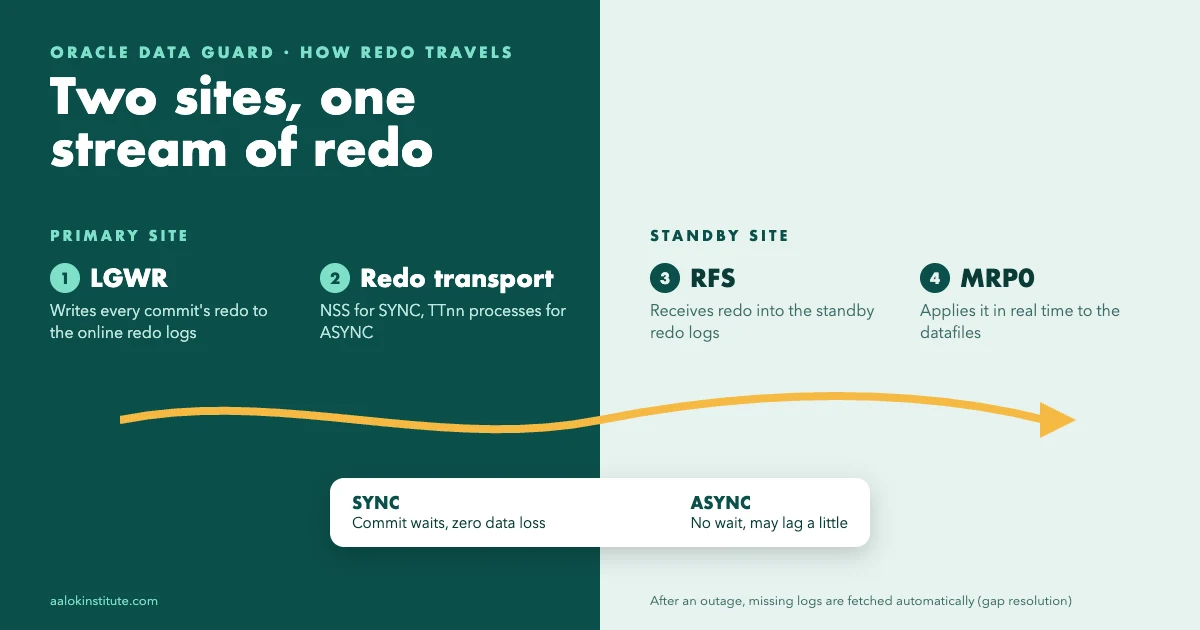
Everything in Data Guard comes down to redo: the record of every change made to the database. It goes through four stages on its way to the standby.
1. Redo is generated on the primary
As transactions run, the log writer (LGWR) writes redo from the redo log buffer to the online redo log files, exactly as it would without Data Guard.
2. Redo transport services ship it
Redo transport is configured with a LOG_ARCHIVE_DEST_n parameter for each standby. Each destination is either SYNC or ASYNC:
- SYNC: a commit on the primary waits until the standby confirms the redo is written to its standby redo log. That is what makes zero data loss possible, but every commit pays the network round trip. The sending process is NSS.
- ASYNC: commits do not wait. Redo is sent in the background (by the TTnn processes in 19c), so the primary is unaffected, but if the primary is suddenly lost, the last few seconds of redo may never reach the standby.
If the network drops, redo builds up on the primary. When the connection comes back, the missing logs are sent automatically to fill the gap, and the standby can also fetch them itself using the FAL_SERVER parameter.
3. The standby receives it into standby redo logs
On the standby, the RFS (remote file server) process receives the redo and writes it into standby redo logs. Both SYNC and ASYNC transport need them, and so does real-time apply. The usual rule is to create them the same size as the online redo logs, with one more group per thread than the primary has. As each standby redo log fills, it is archived locally, just like an online log on the primary.
-- on the standby: add standby redo logs (same size as the online logs)
-- assumes Oracle Managed Files (DB_CREATE_FILE_DEST set); otherwise name the file:
--   ... GROUP 11 ('/u01/oradata/stby/srl11.log') SIZE 1G;
ALTER DATABASE ADD STANDBY LOGFILE THREAD 1 GROUP 11 SIZE 1G;
4. Apply services bring the standby up to date
On a physical standby, Redo Apply is run by the managed recovery process, MRP0, with parallel recovery processes doing the actual work. On a logical standby, SQL Apply is coordinated by LSP0. By default the standby uses real-time apply: it applies redo straight from the standby redo logs as it arrives, instead of waiting for each log to fill and be archived.
-- start Redo Apply on a physical standby
ALTER DATABASE RECOVER MANAGED STANDBY DATABASE DISCONNECT FROM SESSION;

-- stop it
ALTER DATABASE RECOVER MANAGED STANDBY DATABASE CANCEL;
The three Oracle Data Guard protection modes
The protection mode decides what the primary does when it cannot reach a synchronised standby. It is a trade-off between data safety, performance and availability:
| Mode | Transport | If no standby is reachable | Data loss on failover | Typical use |
|---|---|---|---|---|
| Maximum Protection | SYNC | The primary shuts down rather than commit unprotected | None | Rare. Needs at least two standbys, or one outage stops production |
| Maximum Availability | SYNC | The primary keeps running and resynchronises later | None, unless a second failure happens before the standby catches up | Zero data loss with a nearby standby or a Far Sync instance |
| Maximum Performance (default) | ASYNC | The primary keeps running | Possibly the last few seconds of transactions | Distant DR sites where commit latency matters |
Check the current mode on the primary, and change it with SQL or through the broker:
SELECT protection_mode, protection_level FROM v$database;

-- with SQL: switch the standby destination to SYNC first
ALTER SYSTEM SET log_archive_dest_2=
  'SERVICE=stby SYNC AFFIRM VALID_FOR=(ONLINE_LOGFILES,PRIMARY_ROLE) DB_UNIQUE_NAME=stby';
ALTER DATABASE SET STANDBY DATABASE TO MAXIMIZE AVAILABILITY;

-- or, with the broker:
DGMGRL> EDIT DATABASE 'stby' SET PROPERTY LogXptMode='SYNC';
DGMGRL> EDIT CONFIGURATION SET PROTECTION MODE AS MaxAvailability;
Moving up to Maximum Availability or Maximum Protection only works if at least one standby already receives redo with SYNC transport, which is why both examples set that first. The best way to understand these modes is to break a link on purpose and watch what each one does; in a hands-on Data Guard administration programme you do exactly that in a lab.
Data Guard broker and DGMGRL
You can run Data Guard entirely with SQL and initialisation parameters, but most sites use the Data Guard broker. It keeps the configuration in its own files, runs a DMON process on every database, and turns multi-step operations into single commands. Start it with DG_BROKER_START=TRUE on each database, then manage everything from the DGMGRL command line. These five commands cover most days:
DGMGRL> SHOW CONFIGURATION;
DGMGRL> SHOW DATABASE 'stby';
DGMGRL> VALIDATE DATABASE 'stby';
DGMGRL> SWITCHOVER TO 'stby';
DGMGRL> FAILOVER TO 'stby';
SHOW CONFIGURATION should end with “SUCCESS”. Anything else (a warning, or an error such as ORA-16810) is your cue to run SHOW DATABASE on each member and read what it says. VALIDATE DATABASE tells you whether a standby is ready for a switchover before you need one.
Switchover vs failover
A switchover is planned. The primary and a standby swap roles, with no data loss, and both stay in the configuration. You use it for maintenance: patch the standby, switch over, patch the old primary, and switch back if you want to.
A failover happens when the primary is gone. A standby becomes the new primary, and depending on the protection mode a few seconds of transactions may be lost. Afterwards the old primary cannot simply rejoin. If Flashback Database was enabled, the broker can reinstate it as a standby with REINSTATE DATABASE; if not, it has to be re-created as a new standby from the new primary.
With Fast-Start Failover, the broker does the failover for you. A separate observer process, ideally at a third site, watches both databases. If the primary stays unreachable for longer than the configured threshold, the observer triggers the failover automatically, and it can reinstate the old primary when it comes back.
Active Data Guard
A plain physical standby can be opened read-only, but only with Redo Apply stopped, so it falls behind while anyone is querying it. Active Data Guard removes that limit: the standby stays open for read-only queries while redo is still being applied, so reports and read traffic can move off the primary. It also adds features such as automatic repair of corrupt blocks from the other database. Active Data Guard is a separately licensed option.
Setting up a physical standby: the main steps
A full build takes a few pages of commands, but the shape is always the same:
- Prepare the primary. It must be in ARCHIVELOG mode, and
FORCE LOGGINGshould be on so that NOLOGGING operations cannot leave holes in the standby. Add standby redo logs here too, so they are ready if the roles ever swap. - Set the Data Guard parameters on the primary (see below), give each database its own
DB_UNIQUE_NAME, and add TNS entries for both databases on both servers. - Copy the password file from the primary to the standby server. Redo transport authenticates with it, and a mismatch is the most common reason a new standby does not receive anything.
- Create the standby with RMAN, usually straight over the network with
DUPLICATE TARGET DATABASE FOR STANDBY FROM ACTIVE DATABASE. - Start Redo Apply, check that logs are arriving and being applied, then create the broker configuration.
ALTER DATABASE FORCE LOGGING;

ALTER SYSTEM SET log_archive_config='DG_CONFIG=(prod,stby)';
ALTER SYSTEM SET log_archive_dest_2=
  'SERVICE=stby ASYNC VALID_FOR=(ONLINE_LOGFILES,PRIMARY_ROLE) DB_UNIQUE_NAME=stby';
-- FAL_SERVER is used after a role swap; on the standby it points to 'prod'
ALTER SYSTEM SET fal_server='stby';
ALTER SYSTEM SET standby_file_management='AUTO';
RMAN duplication, password files and network setup are all things you learn in core Oracle DBA training first; Data Guard builds on top of them.
Common Data Guard problems and their fixes
- Redo is not reaching the standby (ORA-16191 on the primary). Usually the standby’s (or Far Sync instance’s) password file does not match the primary’s. In 19c, password changes on the primary are copied to physical standbys automatically, but not to Far Sync instances. Copy the primary’s password file across again.
- A new datafile appears on the standby as UNNAMED.
STANDBY_FILE_MANAGEMENTwas set toMANUAL. Leave it atMANUALfor now, re-create the file withALTER DATABASE CREATE DATAFILE '<UNNAMED name>' AS '<real path>'(orAS NEWwith Oracle Managed Files), then set it toAUTOand restart apply. - Redo stops arriving and apply stalls because the standby’s archive area is full. Applied logs are not being cleaned up. An RMAN deletion policy of
APPLIED ON ALL STANDBYlets the fast recovery area reclaim them safely. - Queries on the standby fail with ORA-26040. Someone ran a NOLOGGING load on the primary without
FORCE LOGGING, so those blocks never reached the standby. Turn onFORCE LOGGING, and repair the standby while the primary is still available (RMANRECOVER ... NONLOGGED BLOCK, or restore the affected files from the primary).
Monitoring a standby
Four views tell you most of what you need. On the standby, V$DATAGUARD_STATS shows transport lag (redo the standby has not received yet) and apply lag (redo received but not yet applied):
SELECT name, value, time_computed FROM v$dataguard_stats
WHERE  name IN ('transport lag', 'apply lag');
Also on the standby, V$ARCHIVE_GAP lists any missing log sequences, and V$DATAGUARD_PROCESS shows whether MRP0 and RFS are running (V$MANAGED_STANDBY in older releases). On the primary, V$ARCHIVE_DEST_STATUS shows the status and the last error for each standby destination.
A rising transport lag usually points to the network or the primary. A rising apply lag with no transport lag usually means MRP0 has stopped, or the standby cannot keep up, and the standby alert log will tell you which. These are also favourite scenario questions in interviews; our list of Oracle DBA interview questions has a full round on Data Guard and RAC. Oracle’s Data Guard Concepts and Administration guide is the complete reference.
Frequently asked questions
What is the difference between Oracle Data Guard and RAC?
RAC runs several instances on different servers against one database on shared storage, so it protects against a server failing but not against losing the storage or the whole site. Data Guard keeps a separate copy of the database, usually at another site, so it protects against site and storage failures. Many companies use both together.
Does Oracle Data Guard need a separate licence?
Data Guard itself is included with Oracle Database Enterprise Edition. Active Data Guard, which adds real-time query on the standby and features such as Far Sync, is a separately licensed option.
Which Data Guard protection mode should I use?
Most configurations use Maximum Performance, the default, especially for distant standbys. Use Maximum Availability when you need zero data loss and the standby, or a Far Sync instance, is close enough for synchronous transport. Maximum Protection is rarely used, because a standby problem can stop the primary.
Free demo class
Learn it hands-on, with trainers who work on real production databases
Aalok Institute runs live online and classroom batches in Oracle DBA, PostgreSQL, MySQL, MongoDB, Oracle Cloud and AWS. Tell us what you're preparing for, and we'll suggest the right batch and set up a free demo class.
Prefer a form? Send us an enquiry →- 4.8 ★on Google, from 684 reviews
- 12,000+students trained
- Vashi + onlineClassroom in Navi Mumbai, live online across India