
Search for PostgreSQL DBA interview questions and most of what comes back is written for developers: joins, GROUP BY, the difference between WHERE and HAVING. That’s not what a DBA panel asks. They want to know whether you can keep a production database running, which means backups that actually restore, replicas that don’t fall behind, and a VACUUM setup that keeps up with the writes.
Below are 50 questions that cover that ground, with answers short enough to say out loud and the commands an interviewer may ask you to type. Freshers should start with architecture and MVCC. With a couple of years of experience, move quickly to replication and the scenario round, because that’s where experienced candidates are usually tested. If you’re coming from Oracle, there’s a section near the end that maps what you already know onto PostgreSQL.
Jump to a section:
- Architecture
- MVCC, VACUUM and bloat
- Backup and recovery
- Replication and high availability
- Performance tuning
- Security and upgrades
- Scenario round
- For Oracle DBAs moving to PostgreSQL
- How to prepare in the last two weeks
- FAQ
Architecture: PostgreSQL DBA interview questions for freshers
Nearly every interview starts here. Interviewers aren’t checking whether you memorised the process list; they want to hear that you know what each piece is for.
1. How does PostgreSQL handle a new client connection?
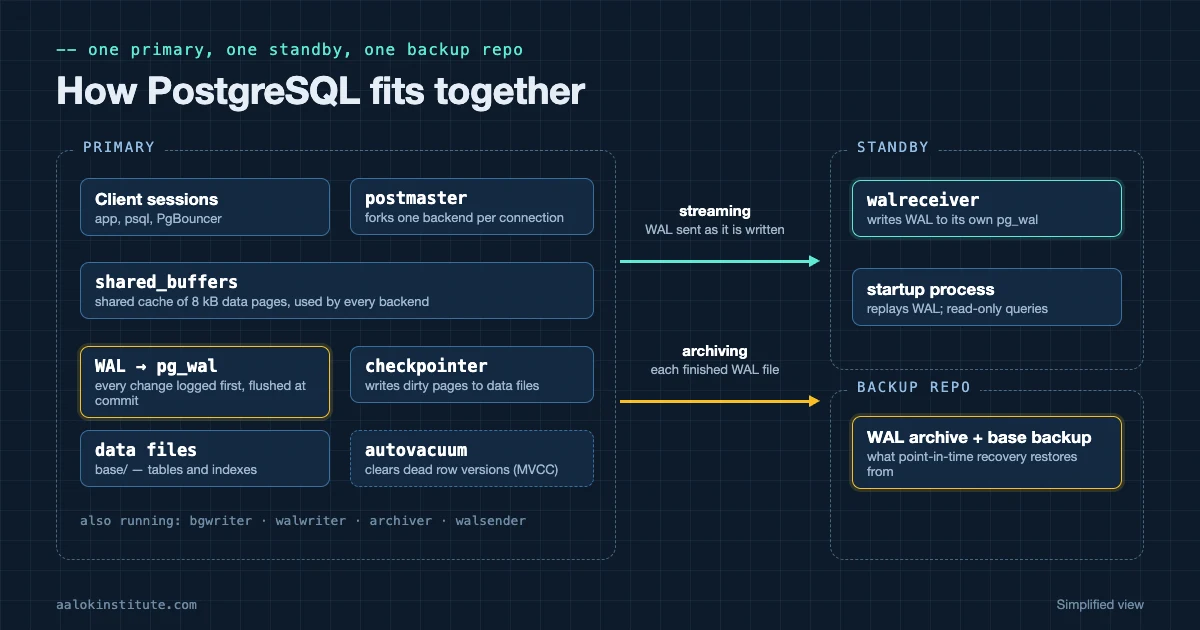
PostgreSQL uses one operating-system process per connection. A supervisor process (traditionally called the postmaster) listens on port 5432. When a client connects, it forks a new backend process, which authenticates the client and then serves only that session until it disconnects.
Every connection is a full process with its own memory, which is why a few thousand direct connections hurt a server and why most production setups put a connection pooler in front.
2. Which background processes does PostgreSQL run, and what do they do?
The checkpointer writes all dirty pages to disk at each checkpoint. The background writer trickles dirty pages out between checkpoints so backends rarely have to write them themselves. The WAL writer flushes WAL to disk. The autovacuum launcher starts autovacuum workers. The archiver copies finished WAL files when archiving is on, and the logical replication launcher manages subscriptions.
On a replication setup you’ll also see walsender processes on the primary and a walreceiver on each standby. Older versions had a separate statistics collector; from PostgreSQL 15 the statistics live in shared memory instead.
3. What is shared_buffers, and how big should it be?
shared_buffers is PostgreSQL’s own cache of 8 kB data pages, shared by all backends. PostgreSQL also relies on the operating system’s file cache, so pages are often cached twice. The usual starting point on a dedicated server is about 25% of RAM; going much above 40% rarely helps.
Changing it needs a restart. Don’t confuse it with effective_cache_size, which allocates nothing and only tells the planner how much caching to expect overall.
4. What is WAL, and why does it matter?
The write-ahead log records every change before the data files are touched. At commit, PostgreSQL flushes the WAL to disk (with the default synchronous_commit = on), and the changed data pages are written later. After a crash, PostgreSQL replays WAL from the last checkpoint to bring the data files back to a consistent state.
The same WAL is what makes point-in-time recovery and streaming replication work. It lives in pg_wal (called pg_xlog before version 10), in 16 MB segment files by default.
5. What happens at a checkpoint?
The checkpointer writes every dirty buffer to the data files and records a checkpoint in the WAL. Crash recovery only has to replay WAL from that point onward. A checkpoint starts when checkpoint_timeout (default 5 minutes) passes or when the WAL generated since the last one approaches max_wal_size (default 1 GB). checkpoint_completion_target spreads the writes out so they don’t hit the disks all at once.
If the log keeps saying checkpoints are occurring too frequently, raise max_wal_size.
6. What is inside the data directory?
base/ holds one subdirectory per database, named by its OID, with each table and index stored as files split into 1 GB segments. global/ holds cluster-wide catalogs such as pg_database. pg_wal/ holds the WAL, pg_xact/ holds transaction commit status, and pg_tblspc/ holds links to tablespaces.
The configuration files usually sit here too: postgresql.conf, postgresql.auto.conf (written by ALTER SYSTEM) and pg_hba.conf. Some packages, Debian and Ubuntu for example, keep postgresql.conf and pg_hba.conf under /etc/postgresql instead; postgresql.auto.conf always stays in the data directory.
7. What is the difference between a database, a schema and a tablespace?
One PostgreSQL server (a cluster) holds many databases. A session connects to exactly one database and can’t query another directly without an extension such as postgres_fdw. A schema is a namespace inside a database; public is the default. A tablespace is simply a directory on disk where you can place objects, and it can be used by any database in the cluster.
Oracle DBAs often trip on this: in PostgreSQL a schema is not the same thing as a user, and a tablespace is a physical location, not a logical container.
8. Why do teams use a connection pooler such as PgBouncer?
Because each connection is a process, thousands of mostly idle application connections waste memory and CPU. PgBouncer keeps a small pool of real server connections and hands them out to many clients. In transaction pooling mode a server connection is returned to the pool after every transaction, which gives the biggest saving.
The catch is that session state doesn’t survive between transactions, so anything relying on SET, session-level advisory locks or temporary tables needs care, or session pooling instead.
9. Which settings need a restart, and which only a reload?
Each parameter has a context in pg_settings. Settings such as shared_buffers, max_connections and wal_level need a restart. Most others, such as work_mem or logging settings, only need a reload. After changing a file and reloading, pending_restart tells you whether a restart is still owed.
ALTER SYSTEM SET work_mem = '32MB';   -- writes postgresql.auto.conf
SELECT pg_reload_conf();

SELECT name, setting, context, pending_restart
FROM   pg_settings
WHERE  name IN ('shared_buffers', 'work_mem', 'max_connections');
MVCC, VACUUM and bloat
If there’s one topic that separates people who have run PostgreSQL from people who have read about it, this is it. Expect follow-up questions.
10. How does MVCC work in PostgreSQL?
PostgreSQL never overwrites a row in place. An UPDATE writes a new version of the row (a tuple) and marks the old one as expired; a DELETE just marks the row as expired. Each tuple carries xmin (the transaction that created it) and xmax (the transaction that deleted or replaced it), and each query’s snapshot decides which versions it can see.
So readers never block writers, and writers never block readers. The price is that old versions stay in the table itself, unlike Oracle, which keeps before-images in the undo tablespace, until VACUUM cleans them up.
11. Why is VACUUM needed?
VACUUM does three jobs. It marks space used by dead tuples as reusable. It updates the visibility map, which lets later vacuums skip clean pages and makes index-only scans possible. And it freezes old transaction IDs so they can’t wrap around (see the next questions).
A plain VACUUM doesn’t normally shrink the file on disk; it only frees space inside it, apart from truncating empty pages at the very end of the table.
12. What is the difference between VACUUM, VACUUM FULL and autovacuum?
VACUUM runs alongside normal reads and writes. VACUUM FULL rewrites the whole table into a new file and gives space back to the operating system, but it holds an ACCESS EXCLUSIVE lock, which blocks even SELECTs, and it needs free disk space roughly the size of the table. On a busy table, the pg_repack extension does the same job with only brief locks.
Autovacuum runs VACUUM and ANALYZE automatically. A table is vacuumed once its dead tuples exceed autovacuum_vacuum_threshold (50) plus autovacuum_vacuum_scale_factor (0.2) times its row count. From version 18 that figure is capped by autovacuum_vacuum_max_threshold (100 million by default).
13. What is transaction ID wraparound?
Transaction IDs are 32-bit and compared in a circle, so any row is only safely “in the past” for about 2 billion transactions. Before a row’s xmin gets that old, VACUUM must freeze it, marking it as visible to everyone. When a table’s oldest unfrozen ID passes autovacuum_freeze_max_age (200 million by default), autovacuum runs an anti-wraparound vacuum even if autovacuum is switched off.
If freezing still can’t keep up, PostgreSQL logs warnings and, close to the limit, stops assigning new transaction IDs, which in practice means no more writes until the oldest tables are vacuumed.
SELECT datname, age(datfrozenxid) AS xid_age
FROM   pg_database
ORDER  BY xid_age DESC;
14. How do you find table bloat?
Start with pg_stat_user_tables: a high n_dead_tup compared with n_live_tup, and an old last_autovacuum, point to tables autovacuum isn’t keeping up with. For exact figures, the pgstattuple extension reads the table and reports dead and free space, though it is expensive on large tables.
SELECT relname, n_live_tup, n_dead_tup, last_autovacuum
FROM   pg_stat_user_tables
ORDER  BY n_dead_tup DESC
LIMIT  10;
15. What can stop VACUUM from removing dead rows?
VACUUM can only remove a dead tuple if no running transaction might still need to see it. The usual culprits are a long-running query or a session left idle in transaction, a replication slot with an old xmin or catalog_xmin (a physical slot used with hot_standby_feedback, or a logical slot, which holds back the system catalogs), a standby running long queries with hot_standby_feedback on, and forgotten prepared transactions in pg_prepared_xacts.
Check backend_xmin and xact_start in pg_stat_activity for the oldest sessions, and pg_replication_slots for slots holding things back.
16. What is a HOT update?
A heap-only tuple (HOT) update happens when an UPDATE changes no indexed column (from version 16, columns covered only by BRIN indexes don’t count) and the new row version fits on the same page as the old one. PostgreSQL then adds no new index entries, which saves a lot of write work and index bloat.
To get more HOT updates on a frequently updated table, lower its fillfactor (for example to 90) so each page keeps free space, and avoid indexing columns that change often. n_tup_hot_upd in pg_stat_user_tables shows how many updates were HOT.
17. How would you tune autovacuum for a large, busy table?
The default scale factor of 0.2 means a 100-million-row table waits for 20 million dead rows before it is vacuumed. Set lower thresholds on that table alone rather than for the whole cluster. If workers can’t keep up across the cluster, raise autovacuum_vacuum_cost_limit so each worker does more before pausing, and give them more memory with maintenance_work_mem or autovacuum_work_mem.
Switching autovacuum off to “save I/O” is almost never the right answer; the bloat and wraparound risk come back worse.
ALTER TABLE orders SET (
  autovacuum_vacuum_scale_factor = 0.01,
  autovacuum_vacuum_threshold   = 1000,
  autovacuum_analyze_scale_factor = 0.02
);
Backup and recovery
Interviewers ask how you back up, then ask how you restore, then ask how you know the restore works. Have an answer for all three.
18. What is the difference between pg_dump and pg_basebackup?
pg_dump takes a logical backup of one database: SQL or an archive of the objects and data, taken from a consistent snapshot. It can be restored into a newer major version or a different platform, and you can restore single tables. It doesn’t include roles or tablespaces, so pair it with pg_dumpall --globals-only.
pg_basebackup takes a physical copy of the whole cluster while it runs. It restores quickly, is the starting point for point-in-time recovery and for building standbys, but only works with the same major version.
19. Which pg_dump formats are there, and which do you use?
Plain format writes a SQL script that you restore with psql. Custom (-Fc), directory (-Fd) and tar formats are restored with pg_restore, which can restore selected objects and run in parallel. Directory format can also dump in parallel. For anything beyond a small database, custom or directory format is the usual choice.
pg_dump -Fc -d sales -f sales.dump
pg_dump -Fd -j 4 -d sales -f /backup/sales_dir
pg_restore -d sales_restore -j 4 sales.dump
pg_dumpall --globals-only > globals.sql
20. How do you set up WAL archiving?
Set wal_level to replica (the default since version 10), archive_mode = on (needs a restart) and an archive_command that copies each finished WAL file somewhere safe. The command must return success only when the file is really stored, and must refuse to overwrite an existing file.
If archiving fails, WAL piles up in pg_wal until the disk fills, so watch pg_stat_archiver for a rising failed_count.
# postgresql.conf
wal_level = replica
archive_mode = on
archive_command = 'test ! -f /archive/%f && cp %p /archive/%f'
21. Walk me through a point-in-time recovery.
You need a base backup taken before the target time plus every archived WAL file from then on. Stop the server, keep a copy of the current data directory and its pg_wal (it may hold WAL that was never archived), and restore the base backup into place. Then set restore_command and a recovery target, create recovery.signal and start the server. It replays WAL up to the target and then follows recovery_target_action.
From version 12 these settings go in postgresql.conf; older versions used a separate recovery.conf file.
# postgresql.conf on the restored copy
restore_command = 'cp /archive/%f %p'
recovery_target_time = '2026-11-02 14:30:00+05:30'
recovery_target_action = 'promote'

$ touch $PGDATA/recovery.signal
$ pg_ctl -D $PGDATA start
22. What is a timeline?
Each time a server ends recovery early (after point-in-time recovery) or a standby is promoted, PostgreSQL starts a new timeline. The timeline ID is the first part of every WAL file name, and a small .history file records where it branched off. Timelines stop WAL from two different histories getting mixed, and they let you recover along whichever branch you want with recovery_target_timeline (latest by default since version 12).
23. Why use pgBackRest or Barman instead of plain pg_basebackup?
They add the things you need once there are real retention rules: full, differential and incremental backups, parallel compression, retention policies, backup verification, asynchronous WAL archiving and repositories on S3-compatible or other cloud storage. pgBackRest can also restore only the files that changed (--delta), which makes rebuilding a large standby much faster.
Barman, maintained by EDB, is popular for backing up many servers from one central backup host. Version 17 added incremental backups to pg_basebackup itself, but most teams still use one of these tools.
24. How do you prove your backups can be restored?
Restore them, on a schedule, to a separate server, and time it, because that number is your real recovery time. Between restore tests, pg_verifybackup (version 13 and later) checks a pg_basebackup against its manifest, and pgBackRest’s check and verify commands confirm that archiving works and the repository is intact. Also keep an eye on pg_stat_archiver; a gap in the WAL archive silently breaks point-in-time recovery.
Replication and high availability
Experienced candidates get most of their questions here. Be ready to draw the setup and explain what happens when each piece fails.
25. How does streaming replication work?
A standby connects to the primary over a replication connection. A walsender process on the primary streams WAL records as they are written, the standby’s walreceiver writes them to its own pg_wal, and its startup process replays them. The result is a block-for-block copy of the whole cluster, readable when hot_standby is on (the default).
The quickest way to build one is pg_basebackup with -R, which writes primary_conninfo and creates standby.signal for you.
pg_basebackup -h primary.example.com -U replicator \
  -D /var/lib/postgresql/data -R -X stream -P
26. What is the difference between synchronous and asynchronous replication?
By default replication is asynchronous: a commit returns as soon as the WAL is flushed on the primary, so a failover can lose the last few transactions. With synchronous replication you list standbys in synchronous_standby_names and the commit waits for them. synchronous_commit decides how far: remote_write, on (flushed on the standby) or remote_apply (visible on the standby).
The trap: if no synchronous standby is available, commits on the primary simply wait. That’s why production setups use two or more candidates, for example 'ANY 1 (s1, s2)'.
27. What is a replication slot, and what is the risk?
A slot makes the primary keep every WAL file until the consumer attached to it has received it, so a standby or logical subscriber that disconnects for a while can catch up without being rebuilt.
The risk is an abandoned slot: the primary keeps WAL for it forever, and pg_wal grows until the disk is full. From version 13, max_slot_wal_keep_size caps how much a slot can hold. Monitor inactive slots and the WAL each one retains:
SELECT slot_name, slot_type, active,
       pg_size_pretty(pg_wal_lsn_diff(pg_current_wal_lsn(), restart_lsn)) AS retained_wal
FROM   pg_replication_slots;
28. When would you use logical replication instead of streaming replication?
Logical replication (publications and subscriptions, from version 10) copies row changes for chosen tables rather than the whole cluster. Use it to move only some tables, to feed a reporting database that has its own extra tables or indexes, or to upgrade between major versions with very little downtime, since publisher and subscriber can run different versions.
Know its limits: schema changes and sequence values aren’t replicated, and a table in a publication that replicates UPDATEs and DELETEs needs a primary key (or another replica identity), otherwise those statements fail on the publisher.
-- on the publisher
CREATE PUBLICATION sales_pub FOR TABLE orders, customers;

-- on the subscriber
CREATE SUBSCRIPTION sales_sub
  CONNECTION 'host=primary.example.com dbname=sales user=repuser'
  PUBLICATION sales_pub;
29. How do you monitor replication lag?
On the primary, pg_stat_replication has one row per connected standby, with the WAL positions it has written, flushed and replayed, plus write_lag, flush_lag and replay_lag as time intervals. On a standby, compare pg_last_wal_receive_lsn() with pg_last_wal_replay_lsn().
Be careful with now() - pg_last_xact_replay_timestamp(): on a quiet primary it keeps growing even though the standby is fully caught up.
SELECT application_name, state, sync_state,
       pg_size_pretty(pg_wal_lsn_diff(pg_current_wal_lsn(), replay_lsn)) AS replay_gap,
       replay_lag
FROM   pg_stat_replication;
30. What is Patroni?
Patroni is an open-source high-availability manager. An agent runs next to each PostgreSQL node and keeps a leader lock in a distributed configuration store such as etcd, Consul, ZooKeeper or Kubernetes. Only the node holding the lock runs as primary. If the primary stops renewing the lock, the remaining nodes elect a new leader and promote it automatically.
Patroni also builds replicas and manages configuration across the cluster. Applications usually reach the current primary through HAProxy or a virtual IP. Expect to be asked about patronictl list and patronictl switchover.
31. What is repmgr, and how does it compare with Patroni?
repmgr, from EDB, is a set of tools to clone standbys, register nodes, run switchovers and monitor the cluster, with the repmgrd daemon handling automatic failover. It needs no separate consensus store, which makes it simpler to set up. The trade-off is weaker protection against split-brain: it relies on witness nodes and careful configuration, where Patroni relies on the consensus store. Many teams pick repmgr for small setups and Patroni for larger or Kubernetes-based ones.
32. What is the difference between switchover and failover?
A switchover is planned: the primary shuts down cleanly, a standby is promoted, and the old primary rejoins as a standby with no data loss. A failover happens because the primary is gone: you promote a standby with pg_ctl promote or SELECT pg_promote();, accepting any transactions that never reached it.
Afterwards the old primary can’t simply rejoin, because its history has diverged. pg_rewind can rewind it to match the new primary (it needs wal_log_hints = on or data checksums), or you rebuild it from a fresh base backup. Make sure the old primary can’t come back up as a second primary.
pg_rewind --target-pgdata=$PGDATA \
  --source-server='host=new-primary user=postgres dbname=postgres'
Performance tuning
Explain how you’d find the problem before you suggest a fix. Jumping straight to “add an index” is the most common way to lose marks here.
33. What is the difference between EXPLAIN and EXPLAIN ANALYZE?
EXPLAIN shows the plan the optimiser intends to use, with estimated costs and row counts. EXPLAIN ANALYZE actually runs the statement and adds real times and row counts for every step. Add BUFFERS (included automatically with ANALYZE from version 18) to see how many pages were found in shared_buffers (hit) and how many had to be read from the OS cache or disk (read).
Because ANALYZE really executes the statement, wrap an UPDATE or DELETE in a transaction you roll back.
BEGIN;
EXPLAIN (ANALYZE, BUFFERS)
DELETE FROM orders WHERE created_at < '2024-01-01';
ROLLBACK;
34. How do you read an execution plan?
Read it from the innermost, most indented step outward, since that’s where execution starts. On each step compare the estimated rows with the actual rows; a big gap usually means stale or missing statistics, and the planner then picks the wrong join or scan. Multiply per-loop times by loops to see a step’s real cost.
Know the common steps: Seq Scan, Index Scan, Index Only Scan and Bitmap Heap Scan for reading tables, and Nested Loop, Hash Join and Merge Join for joins. A sequential scan isn’t automatically bad; on a small table, or when most rows are needed, it is the right choice.
35. Which index types does PostgreSQL have, and when do you use each?
B-tree, the default, handles equality, ranges and sorting. Hash handles equality only. GIN suits values that contain many items: arrays, jsonb and full-text search. GiST suits geometric data, ranges and PostGIS, and backs exclusion constraints. SP-GiST handles non-balanced structures such as quadtrees and radix trees (points, IP addresses, text prefixes). BRIN stores a summary per block range, so it stays tiny on very large tables whose rows arrive in order, such as time-stamped logs.
Also mention partial indexes (with a WHERE clause) and expression indexes, and that production indexes should be built with CREATE INDEX CONCURRENTLY so writes aren’t blocked.
36. What is pg_stat_statements, and how do you use it?
It’s an extension that records statistics for every distinct statement, with literal values replaced by placeholders: how often it ran, total and mean execution time, rows returned and buffer usage. It has to be added to shared_preload_libraries (a restart) and then created in the database. Sorting by total time finds what’s costing the server most, which is often a fast query that runs millions of times rather than one slow report.
SELECT left(query, 60) AS query, calls,
       round(total_exec_time) AS total_ms,
       round(mean_exec_time::numeric, 2) AS mean_ms
FROM   pg_stat_statements
ORDER  BY total_exec_time DESC
LIMIT  10;
37. What do work_mem and maintenance_work_mem control?
work_mem is the memory one sort or hash operation can use before spilling to temporary files. It applies per operation, not per session, so one complex query can use several multiples of it, and hash operations can use more again through hash_mem_multiplier. Set it too high with many connections and the server can run out of memory; too low and plans show “external merge Disk”. log_temp_files shows which queries spill.
maintenance_work_mem is used by VACUUM, CREATE INDEX and adding foreign keys, and can safely be much larger because few of those run at once.
38. How do you find out which session is blocking others?
Use pg_blocking_pids() with pg_stat_activity. Once you know the blocker, pg_cancel_backend(pid) cancels its current query and pg_terminate_backend(pid) ends the whole session. To prevent repeats, set lock_timeout for DDL in deployments and idle_in_transaction_session_timeout so forgotten transactions don’t sit on locks.
SELECT pid, pg_blocking_pids(pid) AS blocked_by, state,
       wait_event_type, now() - xact_start AS xact_age,
       left(query, 60) AS query
FROM   pg_stat_activity
WHERE  cardinality(pg_blocking_pids(pid)) > 0;
39. Why does ANALYZE matter, and when do you run it yourself?
ANALYZE samples each table and stores statistics (most common values, histograms, null fractions) that the planner uses to estimate row counts. Autovacuum runs it automatically, but only after enough rows change. Run it yourself straight after a bulk load, after restoring with pg_restore, and after a major version upgrade (before version 18, pg_upgrade didn’t carry statistics over), so the first queries don’t run on bad estimates. For skewed columns, raise the column’s statistics target above the default of 100.
Security and upgrades
Short questions, but getting pg_hba.conf wrong is a classic way to lose an interview.
40. How does pg_hba.conf work?
Each line says which connection type (local, host, hostssl), database, user and client address it applies to, and which authentication method to use. PostgreSQL uses the first line that matches, so order matters. Common methods are scram-sha-256 for passwords (the default password encryption since version 14), peer for local socket connections that match the operating-system user, cert and ldap. trust allows anyone in without a password and doesn’t belong on a production server.
Edits take effect after a reload. “no pg_hba.conf entry for host” in a client error means no line matched.
# TYPE   DATABASE  USER      ADDRESS         METHOD
local    all       postgres                  peer
hostssl  sales     app_user  10.0.1.0/24     scram-sha-256
host     all       all       0.0.0.0/0       reject
41. How do roles and privileges work?
Users and groups are both roles; a user is just a role with LOGIN. Access is granted in layers: CONNECT on the database, USAGE on the schema, then privileges on tables, sequences and functions. ALTER DEFAULT PRIVILEGES covers tables that will be created later by the role that runs it. Predefined roles such as pg_read_all_data and pg_monitor save writing your own grants.
Keep superuser for DBAs only: a superuser skips every permission check.
CREATE ROLE app_read NOLOGIN;
GRANT CONNECT ON DATABASE sales TO app_read;
GRANT USAGE ON SCHEMA app TO app_read;
GRANT SELECT ON ALL TABLES IN SCHEMA app TO app_read;
ALTER DEFAULT PRIVILEGES IN SCHEMA app GRANT SELECT ON TABLES TO app_read;

CREATE ROLE ravi LOGIN PASSWORD 'change-me' IN ROLE app_read;
42. How do you upgrade to a new major version?
There are three main routes. Dump and restore is simple and safe but the downtime grows with the size of the database. pg_upgrade converts the cluster in place; with --link it hard-links the data files and takes minutes even for large databases, but once the new cluster has started you can’t go back to the old one. Logical replication to a new-version server gives the shortest downtime but needs the most preparation.
Always run pg_upgrade --check first, make sure every extension is available for the new version, and refresh statistics afterwards. From version 18 pg_upgrade keeps most of them, so vacuumdb --all --analyze-in-stages --missing-stats-only is enough.
pg_upgrade -b /usr/lib/postgresql/16/bin -B /usr/lib/postgresql/17/bin \
  -d /var/lib/postgresql/16/main -D /var/lib/postgresql/17/main \
  --link --check
43. How do minor version updates differ from major upgrades?
A minor release (16.4 to 16.6, say) contains only bug and security fixes and never changes the on-disk format. You install the new binaries and restart, with no pg_upgrade and no dump. Read the release notes anyway, because now and then a fix asks you to rebuild certain indexes. The PostgreSQL project recommends always running the latest minor release of your major version, and supports each major version for five years.
44. What are data checksums, and should they be on?
With checksums on, PostgreSQL stores a checksum in every data page and verifies it on read, so silent corruption from disks or controllers is reported instead of quietly returning bad data. The overhead is small for most workloads. They are set at initdb time (--data-checksums), turned on by default from version 18, and can be switched on for an existing cluster with pg_checksums while the server is stopped. Checksums also satisfy pg_rewind‘s requirement, so wal_log_hints isn’t needed on a checksummed cluster.
Scenario round: PostgreSQL DBA interview questions for experienced professionals
These come up for roles that ask for three or more years of experience. There’s no single right answer. Walk through how you’d investigate before you say what you’d change.
45. The disk is filling up because pg_wal keeps growing. What do you do?
Find out why WAL isn’t being removed. The usual causes are an inactive replication slot (check pg_replication_slots), a failing archive_command (check last_failed_wal in pg_stat_archiver and the server log), or a very high wal_keep_size. Fix the cause: drop a slot nobody uses, or repair the archive destination. Once a checkpoint runs, PostgreSQL removes the old files itself.
Never delete files from pg_wal by hand; that can leave the database unable to recover.
46. A query that ran in 2 seconds now takes 2 minutes after a large data load. Why?
Most likely the statistics are stale: the table changed a lot and auto-analyze hasn’t run yet, so the planner still thinks the table is small and picks a bad plan. Compare estimated and actual rows in EXPLAIN ANALYZE, run ANALYZE on the table, and check the plan again. If the load also left many pages not marked all-visible, a VACUUM brings back index-only scans. Build ANALYZE into the load job so it doesn’t happen again.
47. A standby is falling behind. How do you find the cause?
Work out where the lag is. In pg_stat_replication, if write_lag is high, WAL isn’t reaching the standby fast enough: look at the network and at bursts of WAL on the primary from bulk loads or index builds. If only replay_lag is high, the standby receives WAL but can’t apply it fast enough. WAL replay runs in a single process, so the standby’s disks matter, and long queries on the standby can pause replay up to max_standby_streaming_delay when they conflict with it.
48. Someone deleted rows from a production table an hour ago. How do you get them back?
PostgreSQL has no flashback query, so the data comes from a backup. Note the exact time of the delete from the logs or the application. Then run a point-in-time recovery to a separate server, stopping just before the delete, export the missing rows and load them back into production. Don’t run point-in-time recovery on production itself, because you’d lose every change made since.
If you keep a delayed standby (recovery_min_apply_delay), you can pause its replay and copy the rows from there, which is much faster.
49. Applications are failing with “sorry, too many clients already”. What now?
Every slot up to max_connections is taken, though a superuser can usually still get in using the reserved slots. Group pg_stat_activity by application, user and state: often most connections are idle, or idle in transaction, because an application pool is too big or is leaking connections. Clear the worst offenders, then fix the cause: right-size the application pools, put PgBouncer in front, and set idle_in_transaction_session_timeout. Raising max_connections needs a restart and costs memory for every extra connection, so it’s rarely the real fix.
SELECT usename, application_name, state, count(*)
FROM   pg_stat_activity
GROUP  BY 1, 2, 3
ORDER  BY 4 DESC;
50. The log warns that a database must be vacuumed within N transactions. How do you handle it?
Treat it as urgent: once fewer than about three million transactions are left, the database stops starting any transaction that needs a new transaction ID, which in practice means no more writes. Find the tables with the oldest relfrozenxid, then find what is stopping VACUUM from freezing them: long-running or idle-in-transaction sessions, orphaned prepared transactions, or old replication slots. Remove the blocker, then run VACUUM on those tables, oldest first. Recent PostgreSQL documentation advises doing this in normal multi-user mode rather than restarting into single-user mode. Afterwards, find out why autovacuum fell behind.
SELECT c.oid::regclass AS table_name, age(c.relfrozenxid) AS xid_age
FROM   pg_class c
WHERE  c.relkind IN ('r', 'm', 't')
ORDER  BY xid_age DESC
LIMIT  10;
Every scenario above is easier to answer once you’ve actually done it. Aalok Institute’s hands-on PostgreSQL training covers backups and point-in-time recovery, streaming replication with repmgr and Patroni, and VACUUM and wraparound in live lab sessions.
For Oracle DBAs moving to PostgreSQL
Plenty of PostgreSQL DBA openings go to people with Oracle experience, and interviewers often ask you to compare the two. This is what maps across:
| In Oracle | In PostgreSQL |
|---|---|
| RMAN | pg_basebackup plus WAL archiving; pgBackRest or Barman for retention and incrementals |
| Data Guard (physical standby) | Streaming replication, with Patroni or repmgr for automatic failover |
| GoldenGate / logical standby | Logical replication (publications and subscriptions) |
| Undo tablespace | No undo: old row versions stay in the table until VACUUM removes them |
| AWR and ASH | pg_stat_statements and pg_stat_activity; there is no built-in history, so teams add monitoring tools or log analysers such as pgBadger |
| Listener and sqlnet.ora | The server listens itself (listen_addresses, port), and pg_hba.conf controls who can connect |
| Schema = user | Schemas and roles are separate; one role can own objects in many schemas |
| RAC | No shared-storage active-active cluster in community PostgreSQL; scale reads with replicas |
The differences that catch Oracle DBAs out are usually behavioural rather than technical: psql commits every statement unless you open a transaction, DDL can be rolled back inside a transaction, there are no optimiser hints in core PostgreSQL, and bloat replaces undo as the thing you watch. If you’re preparing for both kinds of role, our Oracle DBA interview questions cover the Oracle side in the same format, and our Oracle vs PostgreSQL comparison puts the two databases side by side.
How to prepare in the last two weeks
- Build a primary and a standby yourself, on two virtual machines or containers. Break replication on purpose and fix it. You’ll answer the replication questions far more confidently.
- Do one full point-in-time recovery from a base backup and archived WAL. Interviewers can tell quickly whether you’ve done it.
- Create bloat and watch VACUUM deal with it. Update a table in a loop, look at
n_dead_tup, then vacuum it. - Learn the catalog views by heart:
pg_stat_activity,pg_stat_replication,pg_replication_slots,pg_stat_user_tablesandpg_locks. - Brush up on Linux. Most PostgreSQL servers run on it, and interviewers often ask about systemd, disk usage, file permissions and reading logs.
The PostgreSQL documentation’s Server Administration section is the reference for everything above, and the chapters on routine vacuuming and continuous archiving are worth reading in full.
Frequently asked questions
Is PostgreSQL DBA a good career in India?
PostgreSQL is now used widely in Indian product companies, banks and IT services firms, and cloud services such as Amazon RDS and Aurora, Azure Database for PostgreSQL and Google Cloud SQL have added to the demand. Many job descriptions ask for PostgreSQL together with Oracle or a cloud platform, so DBAs who know both are well placed.
Which PostgreSQL DBA interview questions are asked most often?
For freshers: architecture, WAL, MVCC and the difference between pg_dump and pg_basebackup. For experienced candidates: VACUUM and bloat, point-in-time recovery, streaming replication and failover, replication slots, and a scenario round on problems such as replica lag, WAL filling the disk or too many connections.
Do I need Linux skills for a PostgreSQL DBA role?
Yes. Most production PostgreSQL servers run on Linux, so you should be comfortable with systemd services, file permissions, disk and memory checks, editing configuration files, cron jobs and reading logs. Basic shell scripting helps a lot for backup and monitoring jobs.
Free demo class
Learn it hands-on, with trainers who work on real production databases
Aalok Institute runs live online and classroom batches in Oracle DBA, PostgreSQL, MySQL, MongoDB, Oracle Cloud and AWS. Tell us what you're preparing for, and we'll suggest the right batch and set up a free demo class.
Prefer a form? Send us an enquiry →- 4.8 ★on Google, from 684 reviews
- 12,000+students trained
- Vashi + onlineClassroom in Navi Mumbai, live online across India