
RMAN backup is how most Oracle databases are backed up. RMAN (Recovery Manager) is the backup tool that ships with every Oracle Database edition: you connect it to the database and run a command such as BACKUP DATABASE PLUS ARCHIVELOG;, and it reads the datafiles block by block, skips blocks that have never been used, checks for corruption and records everything it wrote so it can find the right pieces again during a restore.
This guide is the set of commands a DBA actually uses: the settings to change before the first backup, each backup type, how to check that backups are usable, seven recovery scenarios in Oracle 19c, cloning a database with RMAN duplicate, and a simple backup plan you can put in cron. The database name ORCL and the /u01 paths are examples. Replace them with your own.
How RMAN works
You start RMAN from the operating system as the oracle user and connect it to the database you want to back up, which RMAN calls the target:
$ export ORACLE_SID=ORCL
$ rman target /

RMAN> SHOW ALL;
A few terms come up in every RMAN conversation:
- Repository. RMAN records every backup in the target database’s control file. Records older than
CONTROL_FILE_RECORD_KEEP_TIME(7 days by default) can be overwritten, so sites with many databases, or long retention, also use a recovery catalog: a schema in a separate database that keeps the history for good (rman target / catalog rco@catdb). - Channels. A channel is a server session that does the reading and writing, to disk or to a tape or cloud library (
SBT). More channels mean more parallel work. - Backup sets and pieces. By default RMAN writes backup sets: its own format, made of one or more files called backup pieces. Only RMAN can restore from them. The alternative is an image copy, an exact copy of a datafile.
- Fast recovery area (FRA). A disk location, set by
DB_RECOVERY_FILE_DEST, where Oracle keeps archived logs, backups, control file autobackups and flashback logs, and deletes the ones that are no longer needed when space runs short.
PostgreSQL splits these jobs between several separate tools. Our Oracle vs PostgreSQL comparison covers how the two approaches differ.
Before your first backup
Put the database in ARCHIVELOG mode
Without archived redo logs you can only take backups with the database mounted after a clean shutdown, and you can only restore to the moment of the backup. Check the mode, set up the FRA (set the size before the location), then switch:
SQL> ARCHIVE LOG LIST
SQL> ALTER SYSTEM SET db_recovery_file_dest_size = 100G SCOPE=BOTH;
SQL> ALTER SYSTEM SET db_recovery_file_dest = '/u01/app/oracle/fast_recovery_area' SCOPE=BOTH;

SQL> SHUTDOWN IMMEDIATE
SQL> STARTUP MOUNT
SQL> ALTER DATABASE ARCHIVELOG;
SQL> ALTER DATABASE OPEN;
Size the FRA for at least one level 0 backup, the incrementals and archived logs for your whole retention period, plus room to spare. A full FRA stops the database from archiving, and soon after that, from accepting changes.
Change the defaults that matter
SHOW ALL lists every RMAN setting, with # default next to the ones nobody has changed. These are the ones most DBAs set on day one:
CONFIGURE RETENTION POLICY TO RECOVERY WINDOW OF 7 DAYS;
CONFIGURE CONTROLFILE AUTOBACKUP ON;
CONFIGURE BACKUP OPTIMIZATION ON;
CONFIGURE DEVICE TYPE DISK PARALLELISM 4 BACKUP TYPE TO BACKUPSET;
CONFIGURE ARCHIVELOG DELETION POLICY TO BACKED UP 1 TIMES TO DEVICE TYPE DISK;- Retention policy. The default is
REDUNDANCY 1, which keeps only one backup of each file. A recovery window says what you actually need: “I must be able to restore to any point in the last 7 days”. RMAN then works out which backups are obsolete. - Control file autobackup. After every backup (and, in ARCHIVELOG mode, after structural changes such as adding a datafile) RMAN saves the control file and spfile. It is on by default when COMPATIBLE is 12.2 or higher, but a 19c database upgraded with an older COMPATIBLE setting may still have it off, so check with SHOW ALL. Without it, losing every control file becomes much harder to recover from.
- Backup optimization. Skips files that already have an identical backup, such as archived logs and read-only tablespaces.
- Parallelism. More than one channel needs Enterprise Edition. Standard Edition 2 backs up with a single channel.
- Archivelog deletion policy. Stops RMAN or the FRA deleting archived logs that haven’t been backed up. On a Data Guard primary, use
APPLIED ON ALL STANDBYas well, so logs aren’t deleted before the standby has them.
RMAN backup types
| Type | What it contains | When to use it |
|---|---|---|
| Full | Every used block of the files you name | Stands alone. It can’t be the base for later incrementals |
| Incremental level 0 | Every used block, same content as a full backup | The base that level 1 backups build on. Use this instead of a full backup if you run incrementals |
| Level 1 differential (the default) | Blocks changed since the last level 1 or level 0 | Smallest nightly backups. A restore applies each level 1 since the level 0 in turn |
| Level 1 cumulative | Blocks changed since the last level 0 | Bigger each day, but a restore needs only the level 0 plus the latest cumulative |
| Image copy | A byte-for-byte copy of each datafile | Takes as much space as the datafiles, but you can switch to it instead of restoring, and roll it forward with level 1 backups (BACKUP INCREMENTAL LEVEL 1 FOR RECOVER OF COPY, applied with RECOVER COPY OF DATABASE) |
Online or offline. In ARCHIVELOG mode RMAN backs up the database while it is open and in use. These are inconsistent backups: the files change during the backup, so a restore always needs archived redo to bring them to a consistent point. An offline backup, taken with the database mounted after a clean shutdown, is consistent and needs no redo. It’s the only kind possible in NOARCHIVELOG mode.
Block change tracking. Without it, a level 1 backup still reads every block of every datafile to find the changed ones. With it, Oracle records changed blocks in a small tracking file and RMAN reads only those, which can turn a long nightly incremental into a short one. It needs Enterprise Edition:
SQL> ALTER DATABASE ENABLE BLOCK CHANGE TRACKING
     USING FILE '/u01/app/oracle/oradata/ORCL/bct.chg';
SQL> SELECT status, filename FROM v$block_change_tracking;
Compression. BACKUP AS COMPRESSED BACKUPSET uses BASIC compression by default, which needs no extra licence. The LOW, MEDIUM and HIGH algorithms, set with CONFIGURE COMPRESSION ALGORITHM, are usually faster or smaller, but need the Advanced Compression option.
RMAN backup commands
Run these at the RMAN> prompt. In RMAN, comments start with #.
Whole database
# Database plus all archived logs (RMAN switches the log before and after)
BACKUP DATABASE PLUS ARCHIVELOG;

# Weekly base and nightly incrementals, tagged so they are easy to find
BACKUP INCREMENTAL LEVEL 0 DATABASE TAG 'WEEKLY_L0';
BACKUP INCREMENTAL LEVEL 1 DATABASE TAG 'DAILY_L1';
BACKUP INCREMENTAL LEVEL 1 CUMULATIVE DATABASE;

# Compressed, and split into 32 GB sections so big datafiles use several channels
BACKUP AS COMPRESSED BACKUPSET SECTION SIZE 32G DATABASE;

# Choose where the pieces go: %d = database name, %T = date, %U = unique name
BACKUP DATABASE FORMAT '/backup/ORCL/%d_%T_%U.bkp';
Archived logs
# Back up only the logs that have no backup yet
BACKUP ARCHIVELOG ALL NOT BACKED UP 1 TIMES;

# Back up all logs, then delete them from disk
BACKUP ARCHIVELOG ALL DELETE INPUT;
Parts of the database
BACKUP TABLESPACE users;
BACKUP DATAFILE 7;
BACKUP CURRENT CONTROLFILE;
BACKUP SPFILE;

# Multitenant: connected to the root container
BACKUP PLUGGABLE DATABASE pdb1;

# Image copies instead of backup sets
BACKUP AS COPY DATABASE;
Checking your backups
A backup job that finished isn’t the same as a backup you can restore. These are the checks worth running every day or every week:
LIST BACKUP SUMMARY;
LIST BACKUP OF DATABASE COMPLETED AFTER 'SYSDATE-1';

# Files that don't meet the retention policy, and backups it no longer needs
REPORT NEED BACKUP;
REPORT OBSOLETE;

# Mark backups and logs that were deleted outside RMAN as EXPIRED, then remove the records
CROSSCHECK BACKUP;
CROSSCHECK ARCHIVELOG ALL;
DELETE NOPROMPT EXPIRED BACKUP;
DELETE NOPROMPT EXPIRED ARCHIVELOG ALL;
DELETE NOPROMPT OBSOLETE;

# Read the backups as a restore would, without writing anything
RESTORE DATABASE VALIDATE;

# Check the datafiles themselves for physical and logical corruption
BACKUP VALIDATE CHECK LOGICAL DATABASE;
From SQL*Plus, V$RMAN_BACKUP_JOB_DETAILS shows the status of recent jobs, which is what most monitoring scripts check:
SELECT session_key, input_type, status,
       TO_CHAR(start_time, 'DD-MON HH24:MI') AS started,
       time_taken_display, output_bytes_display
FROM   v$rman_backup_job_details
WHERE  start_time > SYSDATE - 7
ORDER  BY start_time;
For a backup that is running now, V$SESSION_LONGOPS shows how far it has got:
SELECT sid, opname, sofar, totalwork,
       ROUND(sofar / totalwork * 100, 1) AS pct_done
FROM   v$session_longops
WHERE  opname LIKE 'RMAN%'
AND    opname NOT LIKE '%aggregate%'
AND    totalwork > 0
AND    sofar <> totalwork;
RMAN backup and recovery scenarios in Oracle 19c
Since Oracle 12c you can run SQL statements such as ALTER DATABASE straight from the RMAN prompt, without the old SQL '...' wrapper, so each scenario below runs in a single RMAN session. To find which file is damaged, check the alert log (errors such as ORA-01157 and ORA-01110 name the file), or run REPORT SCHEMA; and query V$RECOVER_FILE.
1. A datafile is lost (not SYSTEM or UNDO)
The database can stay open. Only the objects in that datafile are unavailable while you work:
ALTER DATABASE DATAFILE 7 OFFLINE;
RESTORE DATAFILE 7;
RECOVER DATAFILE 7;
ALTER DATABASE DATAFILE 7 ONLINE;
If the disk itself is gone, restore the file to a new location:
RUN {
  SET NEWNAME FOR DATAFILE 7 TO '/u02/oradata/ORCL/users01.dbf';
  RESTORE DATAFILE 7;
  SWITCH DATAFILE 7;
  RECOVER DATAFILE 7;
}
ALTER DATABASE DATAFILE 7 ONLINE;
2. The SYSTEM or UNDO datafile is lost
The database can’t stay open without these, so the recovery happens in MOUNT mode. Use the number of the lost file: 1 is SYSTEM, and REPORT SCHEMA shows the UNDO file’s number.
SHUTDOWN ABORT;
STARTUP MOUNT;
RESTORE DATAFILE 1;
RECOVER DATAFILE 1;
ALTER DATABASE OPEN;
3. All control files are lost
If even one multiplexed copy survives, shut down and copy it over the lost ones; you don’t need RMAN. If every copy is gone, restore one from the autobackup:
STARTUP NOMOUNT;
RESTORE CONTROLFILE FROM AUTOBACKUP;
ALTER DATABASE MOUNT;
RECOVER DATABASE;
ALTER DATABASE OPEN RESETLOGS;
RMAN finds the autobackup on its own when it is in the FRA. If your autobackups go somewhere else and you don’t use a recovery catalog, RMAN needs the database’s DBID first (SET DBID 1234567890;). It’s printed every time RMAN connects and is part of the autobackup file name when autobackups go outside the FRA (c-DBID-date-sequence), so keep a note of it for every database you look after. A restored control file always means opening with RESETLOGS, so take a new backup straight afterwards.
4. The spfile is lost
If the instance is still running, the quickest fix doesn’t need a backup at all. Run CREATE SPFILE FROM MEMORY; in SQL*Plus. If the instance is down, RMAN can start it with a dummy parameter file and restore the spfile from an autobackup:
SET DBID 1234567890;   # needed only if the autobackup is outside the FRA
STARTUP FORCE NOMOUNT;
RESTORE SPFILE FROM AUTOBACKUP
  RECOVERY AREA '/u01/app/oracle/fast_recovery_area' DB_NAME 'ORCL';
STARTUP FORCE;
The dummy instance doesn’t know where the FRA is, which is why the command names the recovery area and the database name.
5. Point-in-time recovery of the whole database
Someone ran a bad batch job or dropped the wrong schema at 2:30 pm, and you need the database as it was at 2:25. The whole database goes back to that point, and every change made after it is lost:
SHUTDOWN IMMEDIATE;
STARTUP MOUNT;
RUN {
  SET UNTIL TIME "TO_DATE('2026-11-19 14:25:00','YYYY-MM-DD HH24:MI:SS')";
  RESTORE DATABASE;
  RECOVER DATABASE;
}
ALTER DATABASE OPEN RESETLOGS;
SET UNTIL SCN and SET UNTIL SEQUENCE work the same way if you know the SCN or the log sequence instead of the time. If Flashback Database is enabled (Enterprise Edition only) and its logs reach back far enough, FLASHBACK DATABASE TO TIMESTAMP gets there much faster, because nothing is restored.
6. Corrupt blocks in a datafile
ORA-01578 in the alert log or an application error names the file and block. You can repair just those blocks while the rest of the datafile stays online (block media recovery needs Enterprise Edition):
# Find corruption first: this fills V$DATABASE_BLOCK_CORRUPTION
BACKUP VALIDATE CHECK LOGICAL DATABASE;

# Repair one block, or everything in the list
RECOVER DATAFILE 7 BLOCK 233;
RECOVER CORRUPTION LIST;
7. One table needs to go back in time
For a dropped table, check the recycle bin first: FLASHBACK TABLE hr.employees TO BEFORE DROP; is instant. For a table whose rows were changed or deleted, RMAN can recover just that table from backups, without touching the rest of the database:
RECOVER TABLE hr.employees
  UNTIL TIME "TO_DATE('2026-11-19 09:00:00','YYYY-MM-DD HH24:MI:SS')"
  AUXILIARY DESTINATION '/u01/aux'
  REMAP TABLE hr.employees:employees_old;
Behind the scenes RMAN builds a temporary auxiliary instance in the auxiliary destination, restores the tablespaces it needs, recovers them to that time, exports the table with Data Pump and imports it into the live database under the new name. It needs enough free space for those tablespaces and can take a while, but it’s far less disruptive than a full point-in-time recovery. For a table in a pluggable database, add OF PLUGGABLE DATABASE pdb1. RECOVER TABLE needs Enterprise Edition and a database in ARCHIVELOG mode.
Duplicate database using RMAN
RMAN DUPLICATE creates a copy of a database with a new name and DBID, usually to refresh a test or UAT database from production. There are two ways to do it:
- Active duplication copies the files over the network from the running source database. No backup is needed, but the copy loads the source and the network. If the source is open, it must be in ARCHIVELOG mode.
- Backup-based duplication builds the copy from existing backups. With
BACKUP LOCATIONyou don’t even need to connect to the source, which keeps production out of it entirely.
Before running it, prepare the auxiliary (new) instance on the destination server:
- a password file with the same SYS password as the source
- a small parameter file with at least
db_name,control_filesand, if the paths differ,db_file_name_convertandlog_file_name_convert - the instance started with
STARTUP NOMOUNT - a static listener entry for the auxiliary (an instance in NOMOUNT can’t accept remote connections through dynamic registration), and TNS entries so each side can reach the other
$ rman target sys@ORCL auxiliary sys@DEVDB

# Active duplication
DUPLICATE TARGET DATABASE TO DEVDB
  FROM ACTIVE DATABASE
  USING COMPRESSED BACKUPSET;

# Backup-based duplication, without connecting to the source
# (start RMAN with: rman auxiliary sys@DEVDB)
DUPLICATE DATABASE TO DEVDB
  BACKUP LOCATION '/backup/ORCL';
Add NOFILENAMECHECK only when the copy is on a different server that uses exactly the same file paths as the source. Without it, RMAN stops when the file names match. Never use it when duplicating on the same server, because RMAN could then overwrite the source’s files. With FOR STANDBY and no TO clause, DUPLICATE builds a Data Guard physical standby instead: a standby keeps the source’s DB_NAME and DBID and gets only its own DB_UNIQUE_NAME. Our guide to Oracle Data Guard architecture explains what happens after that.
A simple RMAN backup plan
A common starting point for a single-instance database looks like this. Adjust it to the business’s limits on downtime and data loss:
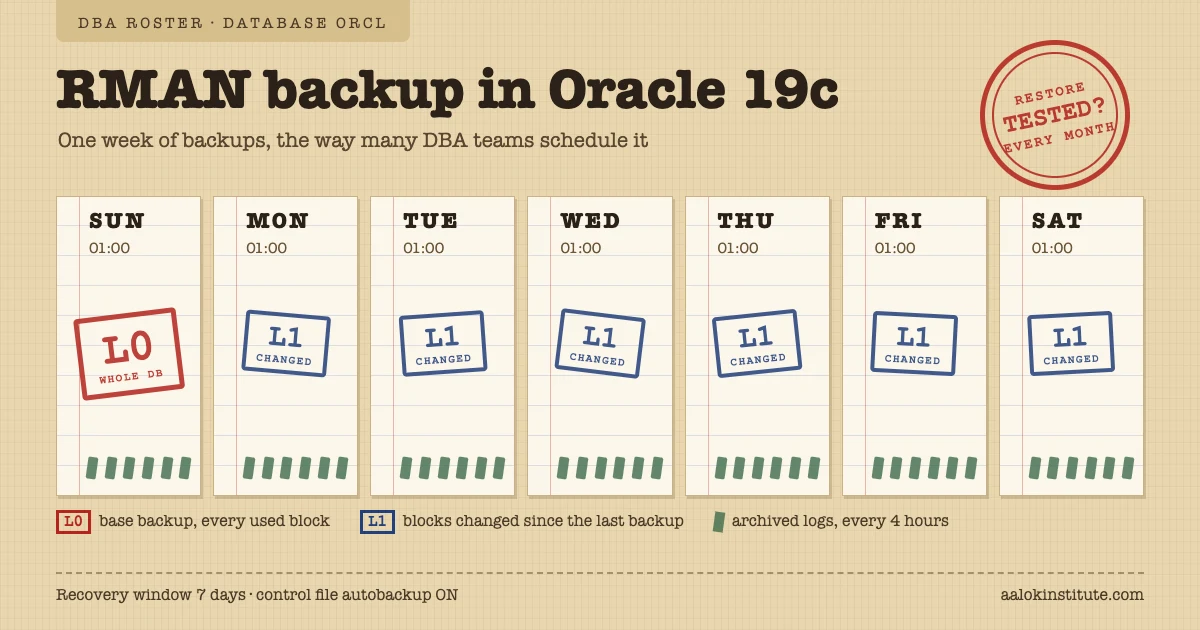
- a level 0 backup once a week, at the quietest time (often early on Sunday morning)
- a level 1 backup on each of the other six nights
- archived log backups every few hours. The gap between them is roughly how much data you can lose if the server and its disks are lost together
- a recovery window of 7 to 14 days, with control file autobackup on
- copies kept away from the database server, on tape or in object storage, through a media management library or the Oracle cloud backup module
- a restore test every month on another server. Untested backups are the usual surprise during a real outage
A shell script for the database backup, which takes the level as an argument:
#!/bin/bash
# /home/oracle/scripts/rman_backup.sh  (usage: rman_backup.sh 0  or  rman_backup.sh 1)
export ORACLE_SID=ORCL
export ORACLE_HOME=/u01/app/oracle/product/19.0.0/dbhome_1
export PATH=$ORACLE_HOME/bin:$PATH
LEVEL=$1
[ "$LEVEL" = 0 ] || [ "$LEVEL" = 1 ] || { echo "usage: $0 0|1"; exit 1; }
LOG=/home/oracle/scripts/logs/rman_$(date +%Y%m%d_%H%M)_L$LEVEL.log

rman target / log=$LOG <<EOF
RUN {
  BACKUP INCREMENTAL LEVEL $LEVEL DATABASE TAG 'L$LEVEL';
  BACKUP ARCHIVELOG ALL NOT BACKED UP 1 TIMES;
  DELETE NOPROMPT OBSOLETE;
}
EOF

if [ $? -ne 0 ]; then
  echo "RMAN level $LEVEL backup of $ORACLE_SID failed. Log: $LOG" | mail -s "RMAN FAILED: $ORACLE_SID" dba-team@example.com
fi
And the crontab entries for the oracle user (crontab -e), with a separate job for archived logs every four hours:
# Level 0 on Sunday, level 1 Monday to Saturday, at 1 am
0 1 * * 0   /home/oracle/scripts/rman_backup.sh 0
0 1 * * 1-6 /home/oracle/scripts/rman_backup.sh 1
# Archived logs every four hours (a second script running BACKUP ARCHIVELOG ALL NOT BACKED UP 1 TIMES)
0 */4 * * * /home/oracle/scripts/rman_arch.sh
The logs directory must exist before the first run, and the email step assumes mailx is set up on the server. Many teams send the result to their monitoring tool instead.
RMAN is easiest to learn by breaking a practice database and recovering it. The RMAN module of Aalok Institute’s Oracle DBA programme works through these recovery scenarios in hands-on lab sessions. RMAN questions also come up in almost every DBA interview, and our Oracle DBA interview questions cover the common ones. Message us on WhatsApp to book a free demo class.
Common RMAN errors and what they mean
- ORA-19809 and ORA-19804 (the fast recovery area is full). Back up archived logs with
DELETE INPUT, runDELETE OBSOLETE, or raisedb_recovery_file_dest_sizeif the disk has room. Left alone, it leads to ORA-00257 and a database that can’t archive, and soon can’t accept changes. - RMAN-06059 (an expected archived log was not found). Someone deleted archived logs at the operating-system level. Run
CROSSCHECK ARCHIVELOG ALL;, then take a new level 0 backup straight away, because recovery can’t pass the gap the missing logs leave. - RMAN-06054 (media recovery requesting an unknown archived log). This usually appears at the end of recovery with a restored control file. If every available log has been applied, open with RESETLOGS. If the log exists somewhere RMAN doesn’t know about, register it with
CATALOG START WITH '/path/';and recover again. - RMAN-06023 (no backup or copy of a datafile found to restore). The backups have expired or been deleted, the recovery target is older than the oldest backup, or the pieces are in a location RMAN has no record of. Check
LIST BACKUP OF DATAFILE 7;and catalog the pieces if you have them.
Frequently asked questions
What is the difference between a full backup and a level 0 backup in RMAN?
Both contain every used block of the datafiles. The difference is what comes after: a level 0 backup can be the parent of later level 1 incremental backups, while a full backup can’t. If you run incrementals, take level 0 backups instead of full ones.
Can RMAN back up a database in NOARCHIVELOG mode?
Yes, but only a consistent backup: shut the database down cleanly, start it in MOUNT mode and run BACKUP DATABASE. You can’t take backups while it is open, and a restore takes you back to the moment of the backup, with every change since then lost. Production databases run in ARCHIVELOG mode for this reason.
How do I check whether last night’s RMAN backup succeeded?
Query V$RMAN_BACKUP_JOB_DETAILS: the STATUS column shows COMPLETED, COMPLETED WITH WARNINGS, COMPLETED WITH ERRORS or FAILED for finished jobs, and RUNNING (or RUNNING WITH WARNINGS or ERRORS) for jobs still in progress. Alert on anything other than COMPLETED. LIST BACKUP SUMMARY in RMAN shows the backup pieces, and the job’s log file shows any RMAN or ORA errors. A successful job only proves the backup was written, so run RESTORE DATABASE VALIDATE regularly to check that it can be read back.
Free demo class
Learn it hands-on, with trainers who work on real production databases
Aalok Institute runs live online and classroom batches in Oracle DBA, PostgreSQL, MySQL, MongoDB, Oracle Cloud and AWS. Tell us what you're preparing for, and we'll suggest the right batch and set up a free demo class.
Prefer a form? Send us an enquiry →- 4.8 ★on Google, from 684 reviews
- 12,000+students trained
- Vashi + onlineClassroom in Navi Mumbai, live online across India